

language:
  - zh
  - en
license: apache-2.0
library_name: transformers
pipeline_tag: image-text-to-text
tags:
  - agnes-ai
  - reasoning
  - multimodal
  - long-context
  - hybrid-attention




Agnes-3.0-Flash Preview
模型版本说明
本仓库包含 Agnes 3.0 Flash 的早期开放权重 Preview checkpoint,它与 Artificial Analysis 页面所列的新版 production/API checkpoint 不同。
本 Preview 版本约有 33B 参数,上下文窗口为 262,144 token。production/API 版本使用不同的 checkpoint 和配置,具有 1M token 上下文窗口;production/API 版本的评测结果不应归属于本仓库发布的 Preview 权重。
本仓库最初以 Agnes-3.0-Flash 发布,名称中遗漏了 Preview 后缀。现在通过模型卡明确将其标识为 Agnes-3.0-Flash Preview,以区分开放权重 Preview 与 production/API 模型。除非另有说明,本模型卡中的规格和 Agnes 评测成绩均指本 Preview checkpoint。
本 Preview 是约 33B 参数的 dense(稠密)checkpoint,不采用 MoE 架构,也不存在“3B active parameters”的口径。评测表中的 active parameter 数字仅用于标注部分对比模型。
你好!👋 今天我们发布 Agnes-3.0-Flash Preview —— 一个开放权重多模态 Preview 模型,面向那些想要旗舰级推理质量、但不想付出旗舰级硬件代价的使用者。
亮点:
- 核心能力表现有竞争力。 Agnes-3.0-Flash Preview 在推理、代码和指令遵循等多项评测中展现出有竞争力的结果。
- 面向真实负载。 262 144 token 上下文、三档可调推理强度、工具调用,以及文本 / 图像 / 视频理解。
评测结果
评测范围: 下图和下表中的 Agnes 成绩属于本仓库发布的 Agnes-3.0-Flash Preview 开放权重 checkpoint,并非 Artificial Analysis 所列 production/API Agnes 3.0 Flash 模型的成绩。
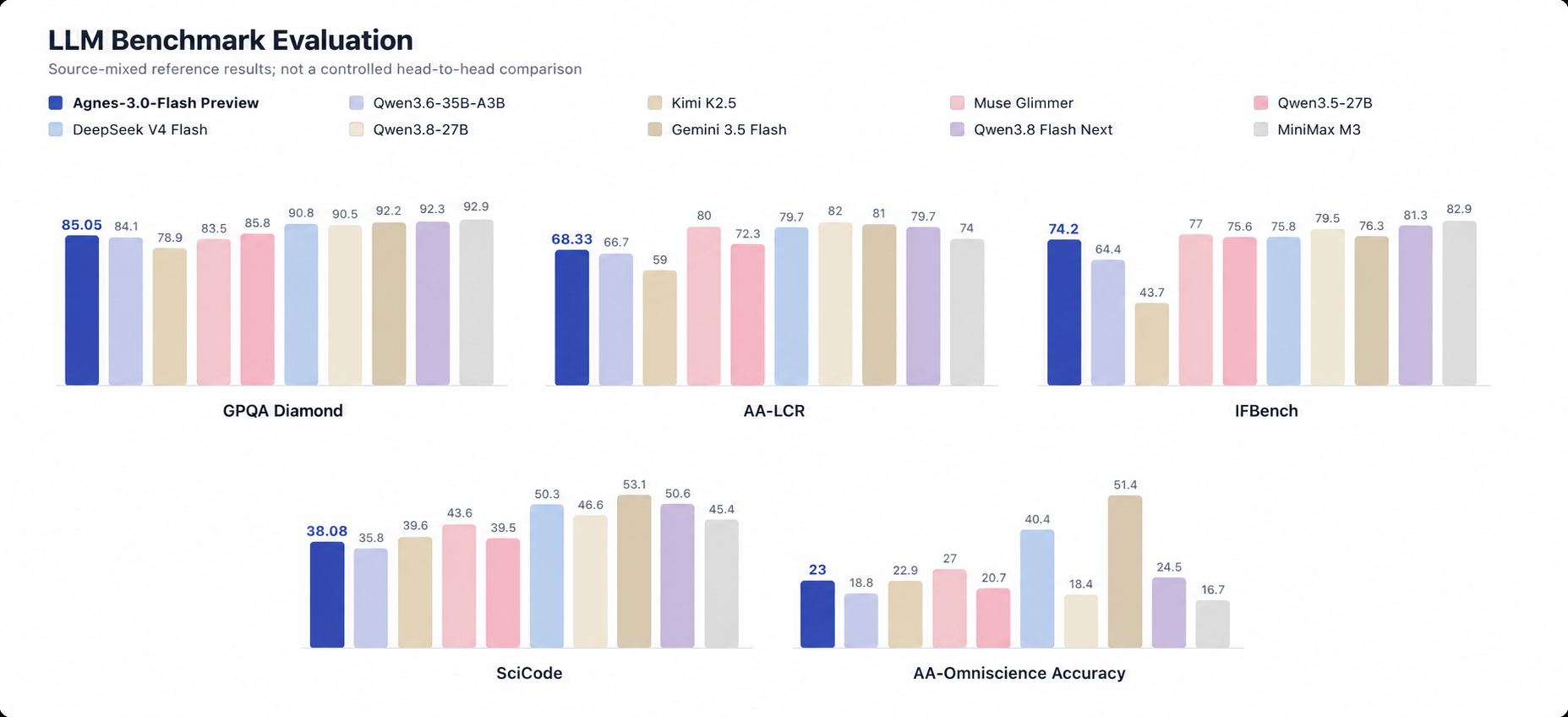
图表中的 Agnes-3.0-Flash Preview 成绩对应本仓库发布的开放权重 checkpoint。
下表汇总了多个同期模型的参考结果。数据来自不同评测环境、模型快照和 harness,不构成同一设置下的受控对比。
| 评测集 | Agnes-3.0-Flash Preview | Qwen3.6-35B-A3B 35B / 3B 激活 |
Kimi K2.5 1T / 32B 激活 |
Muse Glimmer 30B |
Qwen3.5 27B |
DeepSeek V4 Flash 0731 284B / 13B 激活 |
Qwen3.8 27B |
Gemini 3.5 Flash 参数未公开 |
Qwen3.8 Flash Next 125B / 6B 激活 |
MiniMax M3 428B / 23B 激活 |
|---|---|---|---|---|---|---|---|---|---|---|
| IFBench | 74.20 | 64.4 | 43.7 | 77.0 | 75.6 | 75.8 | 79.5 | 76.3 | 81.3 | 82.9 |
| SciCode | 38.08 | 35.8 | 39.6 | 43.6 | 39.5 | 50.3 | 46.6 | 53.1 | 50.6 | 45.4 |
| GPQA Diamond | 85.05 | 84.1 | 78.9 | 83.5 | 85.8 | 90.8 | 90.5 | 92.2 | 92.3 | 92.9 |
| AA-LCR | 68.33 | 66.7 | 59.0 | 80.0 | 72.3 | 79.7 | 82.0 | 81.0 | 79.7 | 74.0 |
| AA-Omniscience 准确率 | 23.00 | 18.8 | 22.9 | 27.0 | 20.7 | 40.4 | 18.4 | 51.4 | 24.5 | 16.7 |
所有指标均为越高越好。表头的参数标注口径不完全一致(总参数 / 激活参数),不同来源的评测 harness 与快照时点也不相同,跨列数值仅作参考,不构成受控的横向对比。
架构
Agnes-3.0-Flash Preview 是一个混合注意力的解码器:每四层中三层走门控 delta rule(循环式,单层状态大小与序列长度无关),第四层走标准全局注意力。72 层里因此只有 18 层持有随长度增长的 KV cache。
| 上下文长度 | 262 144 token |
| 解码层 | 72 层 = 54 层 delta-rule 递归 + 18 层全局注意力,按 3 : 1 交替 |
| 隐藏维度 | 5120 |
| 全局注意力 | 24 query heads / 4 KV heads(GQA 6 : 1),head dim 256;q、k 各带 RMS-norm,输出经 sigmoid 门控 |
| Delta-rule 层 | 16 key heads / 48 value heads,head dim 128;前置因果卷积(kernel 4),gated RMS-norm;循环状态为 fp32 |
| 前馈 | SwiGLU,中间维 17408;每层另并联一路 SwiGLU 2048 分支 |
| 位置编码 | 三轴 rotary(text / height / width),mrope 分段 11 : 11 : 10 交错,base 1e7,作用于 head dim 的前 25%(64 维) |
| 词表 | 248 320 |
| 视觉塔 | 27 层,hidden 1152,patch 16,2 × 2 空间合并,投影至 5120 |
快速开始
Agnes-3.0-Flash Preview 自带模型实现,加载时务必传 trust_remote_code=True。
环境要求
pip install "transformers>=5.12" torch torchvision accelerate
实测环境为 transformers 5.12.1。图像与视频输入由随附的 processor 处理,依赖 torchvision。
Transformers
from transformers import AutoModelForCausalLM, AutoTokenizer

path = "Agnes-AI/Agnes-3.0-Flash"
tok = AutoTokenizer.from_pretrained(path)
model = AutoModelForCausalLM.from_pretrained(
    path, dtype="bfloat16", device_map="auto", trust_remote_code=True
)

msgs = [{"role": "user", "content": "请用三句话解释什么是人工智能。"}]
ids = tok.apply_chat_template(msgs, add_generation_prompt=True, return_tensors="pt").to(model.device)
out = model.generate(ids, max_new_tokens=256)
print(tok.decode(out[0][ids.shape[1]:], skip_special_tokens=True))
图像与视频
图像、视频输入走随模型附带的 processor(同样是 remote code):
from transformers import AutoProcessor

proc = AutoProcessor.from_pretrained(path, trust_remote_code=True)
msgs = [{"role": "user", "content": [{"type": "image", "image": "photo.jpg"},
                                     {"type": "text", "text": "描述这张图。"}]}]
inputs = proc.apply_chat_template(msgs, add_generation_prompt=True, tokenize=True,
                                  return_dict=True, return_tensors="pt").to(model.device)
out = model.generate(**inputs, max_new_tokens=256)
print(proc.batch_decode(out[:, inputs["input_ids"].shape[1]:], skip_special_tokens=True)[0])
推理强度
chat template 提供三档推理强度 —— high(默认)、medium、low,也可以整体关闭思考:
ids = tok.apply_chat_template(msgs, add_generation_prompt=True, return_tensors="pt",
                              reasoning_effort="medium")   # 或 enable_thinking=False
工具调用
chat template 会自动渲染工具定义,模型按 <tool_call><function=…><parameter=…> 的格式发起调用,工具返回值作为 tool 角色消息接回去即可:
tools = [{
    "type": "function",
    "function": {
        "name": "get_weather",
        "description": "查询指定城市的实时天气",
        "parameters": {
            "type": "object",
            "properties": {"city": {"type": "string", "description": "城市名称"}},
            "required": ["city"],
        },
    },
}]

msgs = [{"role": "user", "content": "北京现在天气怎么样?"}]
ids = tok.apply_chat_template(msgs, tools=tools, add_generation_prompt=True,
                              return_tensors="pt").to(model.device)
out = model.generate(ids, max_new_tokens=256)
reply = tok.decode(out[0][ids.shape[1]:], skip_special_tokens=True)
# <tool_call>
# <function=get_weather>
# <parameter=city>
# 北京
# </parameter>
# </function>
# </tool_call>

# 执行工具后把结果接回对话,继续生成最终回复
msgs += [{"role": "assistant", "content": reply},
         {"role": "tool", "content": "晴,26°C,东北风 2 级"}]
走 OpenAI 接口时同样传 tools=。服务端默认原样返回上面这段文本;要拿到结构化的 tool_calls,需给 sglang 配置与该格式匹配的 tool-call parser(思考段同理,需配置 reasoning parser 才会落入 reasoning_content)。
SGLang
serve.sh 用官方公开镜像起服务,只覆盖 sglang 包里的三个文件,镜像内其他内容一概不动。详见 sglang_patch/README.md。
docker run --gpus all --shm-size 64g -p 30001:8080 \
    -v /path/to/agnes-3.0-flash:/model \
    lmsysorg/sglang:nightly-dev-20260908-20ca564b \
    bash /agnes-3.0-flash/serve.sh --served-model-name Agnes-3.0-Flash
serve.sh 会把命令行上的额外参数透传给 sglang,--served-model-name 即由此生效,同理可以追加 --tp 2。服务在容器内 8080 端口启动:
from openai import OpenAI

client = OpenAI(api_key="EMPTY", base_url="http://localhost:30001/v1")
response = client.chat.completions.create(
    model="Agnes-3.0-Flash",
    messages=[{"role": "user", "content": "设计一个容错的事件处理架构。"}],
    temperature=1.0,
    max_tokens=2000,
)
print(response.choices[0].message.content)
流式输出传 stream=True 即可;tools=、reasoning_effort= 等参数同样按 OpenAI 协议传递。
硬件需求
| 资源 | 建议 |
|---|---|
| GPU | 1 × NVIDIA H200 141 GB 或 NVIDIA H100 80 GB(或同等),bf16 |
| 张量并行 | --tp 1;追求最大上下文与并发时用 --tp 2 |
| 权重磁盘占用 | bf16 检查点约 66 GB |
| 主机内存 | 建议 128 GB 以上 |
实际可用上下文长度和并发能力取决于 KV cache 分配、运行时开销和张量并行配置;请在目标硬件上验证实际负载。
推荐推理参数
| 参数 | 推荐值 |
|---|---|
temperature |
1.0 |
top_p |
0.95 |
top_k |
20 |
reasoning_effort |
难推理任务用 high,延迟敏感场景用 low |
max_tokens |
2000 起 |
以上即检查点 generation_config.json 自带的默认值。
能力一览
| 能力 | 支持情况 |
|---|---|
| 深度推理 | 支持,可调 high / medium / low 三档 |
| 代码与调试 | 支持 |
| 长上下文分析 | 262 144 token |
| 图像理解 | 支持 |
| 视频理解 | 支持 |
| 工具调用 | 支持(<tool_call> / <tool_response>) |
| 流式输出 | 支持 |
| OpenAI 兼容接口 | 通过 sglang 提供 Chat Completions |
许可证
本项目采用 Apache License 2.0。
引用
@misc{agnes30flash2026,
  title        = {Agnes-3.0-Flash Preview},
  author       = {{Agnes AI}},
  year         = {2026},
  month        = sep,
  howpublished = {Open-weights preview checkpoint},
  url          = {https://agnes-ai.com/}
}