

Instructions to use Hcompany/Holo4-35B-A3B-GGUF with libraries, inference providers, notebooks, and local apps. Follow these links to get started.
- Libraries
- Transformers
How to use Hcompany/Holo4-35B-A3B-GGUF with Transformers:
# Use a pipeline as a high-level helper from transformers import pipeline pipe = pipeline("image-text-to-text", model="Hcompany/Holo4-35B-A3B-GGUF") messages = [ { "role": "user", "content": [ {"type": "image", "url": "https://huggingface.co/datasets/huggingface/documentation-images/resolve/main/p-blog/candy.JPG"}, {"type": "text", "text": "What animal is on the candy?"} ] }, ] pipe(text=messages)# pip install -U transformers accelerate # Load model directly from transformers import AutoModel model = AutoModel.from_pretrained("Hcompany/Holo4-35B-A3B-GGUF", device_map="auto") - Notebooks
- Google Colab
- Kaggle
- Local Apps Settings
- llama.cpp
How to use Hcompany/Holo4-35B-A3B-GGUF with llama.cpp:
Install (macOS, Linux)
curl -LsSf https://llama.app/install.sh | sh # Start a local OpenAI-compatible server with a web UI: llama serve -hf Hcompany/Holo4-35B-A3B-GGUF:F16 # Run inference directly in the terminal: llama cli -hf Hcompany/Holo4-35B-A3B-GGUF:F16
Install from WinGet (Windows)
winget install llama.cpp # Start a local OpenAI-compatible server with a web UI: llama serve -hf Hcompany/Holo4-35B-A3B-GGUF:F16 # Run inference directly in the terminal: llama cli -hf Hcompany/Holo4-35B-A3B-GGUF:F16
Use pre-built binary
# Download pre-built binary from: # https://github.com/ggerganov/llama.cpp/releases # Start a local OpenAI-compatible server with a web UI: ./llama-server -hf Hcompany/Holo4-35B-A3B-GGUF:F16 # Run inference directly in the terminal: ./llama-cli -hf Hcompany/Holo4-35B-A3B-GGUF:F16
Build from source code
git clone https://github.com/ggerganov/llama.cpp.git cd llama.cpp cmake -B build cmake --build build -j --target llama-server llama-cli # Start a local OpenAI-compatible server with a web UI: ./build/bin/llama-server -hf Hcompany/Holo4-35B-A3B-GGUF:F16 # Run inference directly in the terminal: ./build/bin/llama-cli -hf Hcompany/Holo4-35B-A3B-GGUF:F16
Use Docker
docker model run hf.co/Hcompany/Holo4-35B-A3B-GGUF:F16
- LM Studio
- Jan
- vLLM
How to use Hcompany/Holo4-35B-A3B-GGUF with vLLM:
Install from pip and serve model
# Install vLLM from pip: pip install vllm # Start the vLLM server: vllm serve "Hcompany/Holo4-35B-A3B-GGUF" # Call the server using curl (OpenAI-compatible API): curl -X POST "http://localhost:8000/v1/chat/completions" \ -H "Content-Type: application/json" \ --data '{ "model": "Hcompany/Holo4-35B-A3B-GGUF", "messages": [ { "role": "user", "content": [ { "type": "text", "text": "Describe this image in one sentence." }, { "type": "image_url", "image_url": { "url": "https://cdn.britannica.com/61/93061-050-99147DCE/Statue-of-Liberty-Island-New-York-Bay.jpg" } } ] } ] }'Use Docker
docker model run hf.co/Hcompany/Holo4-35B-A3B-GGUF:F16
- SGLang
How to use Hcompany/Holo4-35B-A3B-GGUF with SGLang:
Install from pip and serve model
# Install SGLang from pip: pip install sglang # Start the SGLang server: python3 -m sglang.launch_server \ --model-path "Hcompany/Holo4-35B-A3B-GGUF" \ --host 0.0.0.0 \ --port 30000 # Call the server using curl (OpenAI-compatible API): curl -X POST "http://localhost:30000/v1/chat/completions" \ -H "Content-Type: application/json" \ --data '{ "model": "Hcompany/Holo4-35B-A3B-GGUF", "messages": [ { "role": "user", "content": [ { "type": "text", "text": "Describe this image in one sentence." }, { "type": "image_url", "image_url": { "url": "https://cdn.britannica.com/61/93061-050-99147DCE/Statue-of-Liberty-Island-New-York-Bay.jpg" } } ] } ] }'Use Docker images
docker run --gpus all \ --shm-size 32g \ -p 30000:30000 \ -v ~/.cache/huggingface:/root/.cache/huggingface \ --env "HF_TOKEN=<secret>" \ --ipc=host \ lmsysorg/sglang:latest \ python3 -m sglang.launch_server \ --model-path "Hcompany/Holo4-35B-A3B-GGUF" \ --host 0.0.0.0 \ --port 30000 # Call the server using curl (OpenAI-compatible API): curl -X POST "http://localhost:30000/v1/chat/completions" \ -H "Content-Type: application/json" \ --data '{ "model": "Hcompany/Holo4-35B-A3B-GGUF", "messages": [ { "role": "user", "content": [ { "type": "text", "text": "Describe this image in one sentence." }, { "type": "image_url", "image_url": { "url": "https://cdn.britannica.com/61/93061-050-99147DCE/Statue-of-Liberty-Island-New-York-Bay.jpg" } } ] } ] }' - Ollama
How to use Hcompany/Holo4-35B-A3B-GGUF with Ollama:
ollama run hf.co/Hcompany/Holo4-35B-A3B-GGUF:F16
- Unsloth Desktop
- Pi
How to use Hcompany/Holo4-35B-A3B-GGUF with Pi:
Start the llama.cpp server
# Install llama.cpp: brew install llama.cpp # Start a local OpenAI-compatible server: llama serve -hf Hcompany/Holo4-35B-A3B-GGUF:F16
Configure the model in Pi
# Install Pi: npm install -g @earendil-works/pi-coding-agent # Add to ~/.pi/agent/models.json: { "providers": { "llama-cpp": { "baseUrl": "http://localhost:8080/v1", "api": "openai-completions", "apiKey": "none", "models": [ { "id": "Hcompany/Holo4-35B-A3B-GGUF:F16" } ] } } }Run Pi
# Start Pi in your project directory: pi
- Docker Model Runner
How to use Hcompany/Holo4-35B-A3B-GGUF with Docker Model Runner:
docker model run hf.co/Hcompany/Holo4-35B-A3B-GGUF:F16
- Lemonade
How to use Hcompany/Holo4-35B-A3B-GGUF with Lemonade:
Pull the model
# Download Lemonade from https://lemonade-server.ai/ lemonade pull Hcompany/Holo4-35B-A3B-GGUF:F16
Run and chat with the model
lemonade run user.Holo4-35B-A3B-GGUF-F16
List all available models
lemonade list
- Hermes Agent
How to use Hcompany/Holo4-35B-A3B-GGUF with Hermes Agent:
Start the llama.cpp server
# Install llama.cpp: brew install llama.cpp # Start a local OpenAI-compatible server: llama serve -hf Hcompany/Holo4-35B-A3B-GGUF:F16
Configure Hermes
# Install Hermes: curl -fsSL https://hermes-agent.nousresearch.com/install.sh | bash hermes setup # Point Hermes at the local server: hermes config set model.provider custom hermes config set model.base_url http://127.0.0.1:8080/v1 hermes config set model.default Hcompany/Holo4-35B-A3B-GGUF:F16
Run Hermes
hermes
- Atomic Chat
- OpenClaw
How to use Hcompany/Holo4-35B-A3B-GGUF with OpenClaw:
Start the llama.cpp server
# Install llama.cpp: brew install llama.cpp # Start a local OpenAI-compatible server: llama serve -hf Hcompany/Holo4-35B-A3B-GGUF:F16
Configure OpenClaw
# Install OpenClaw: npm install -g openclaw@latest # Register the local server and set it as the default model: openclaw onboard --non-interactive --mode local \ --auth-choice custom-api-key \ --custom-base-url http://127.0.0.1:8080/v1 \ --custom-model-id "Hcompany/Holo4-35B-A3B-GGUF:F16" \ --custom-provider-id llama-cpp \ --custom-compatibility openai \ --custom-text-input \ --accept-risk \ --skip-health
Run OpenClaw
openclaw agent --local --agent main --message "Hello from Hugging Face"
Holo4-35B-A3B-GGUF
Holo4 family:
Model summary
Holo4-35B-A3B-GGUF is a vision-language model (VLM) for Computer Use, built on Qwen3.6-35B-A3B and developed by H Company. Used with the hai-agents harness, it can send screenshots and tool results to the model, then execute its requested clicks, typing, code, and tool calls.
| Specification | Value |
|---|---|
| Model ID | Hcompany/Holo4-35B-A3B-GGUF |
| Architecture | Qwen3.6 MoE |
| Checkpoint format | Q4_K_M GGUF |
| Maximum context length in config | 262,144 tokens |
This demo shows Holo4-27B using FreeCAD to build a replica of the Eiffel Tower. More examples in the blog post.
Prompt
Build a 3D Eiffel Tower in FreeCAD at a scale of 1 mm per metre. Center it on the origin and align it with the X and Y axes. Its plan must stay square at every height. The distance from the center to each corner is 62.5 mm at ground level, 32.5 mm at height 57, 17.5 mm at height 115, and 9.35 mm at height 276. Connect these widths with a smooth curve that narrows quickly near the base and more slowly near the top.
Make four separate, identical square legs, one in each quadrant. Their outer corners follow that curve, and each leg narrows from 14 mm across at ground level to 4 mm at height 276. Leave the space between the legs open. Add centered square platforms measuring 72 mm by 72 mm by 4 mm at height 57, 40 mm by 40 mm by 3 mm at height 115, and 22 mm by 22 mm by 3 mm at height 276. Add a square mast from height 276 to 324, tapering from 8 mm across to 2 mm across. Make every component a closed solid with nonzero volume, without filling the space between the legs.
Usage
The harness sends screenshots and tool results to Holo4, executes the model's requested actions, and sends the results back. It can give the model access to application tools and code execution.
Refer to the documentation for more details about:
Performance
Holo4 models improve significantly over their Qwen base models. On OSWorld, Holo4-27B scores 85.2% at $0.08 per task. We also evaluate them on Agentic Task Factory, a set of held-out business workflows across web, desktop, and MCP tools.
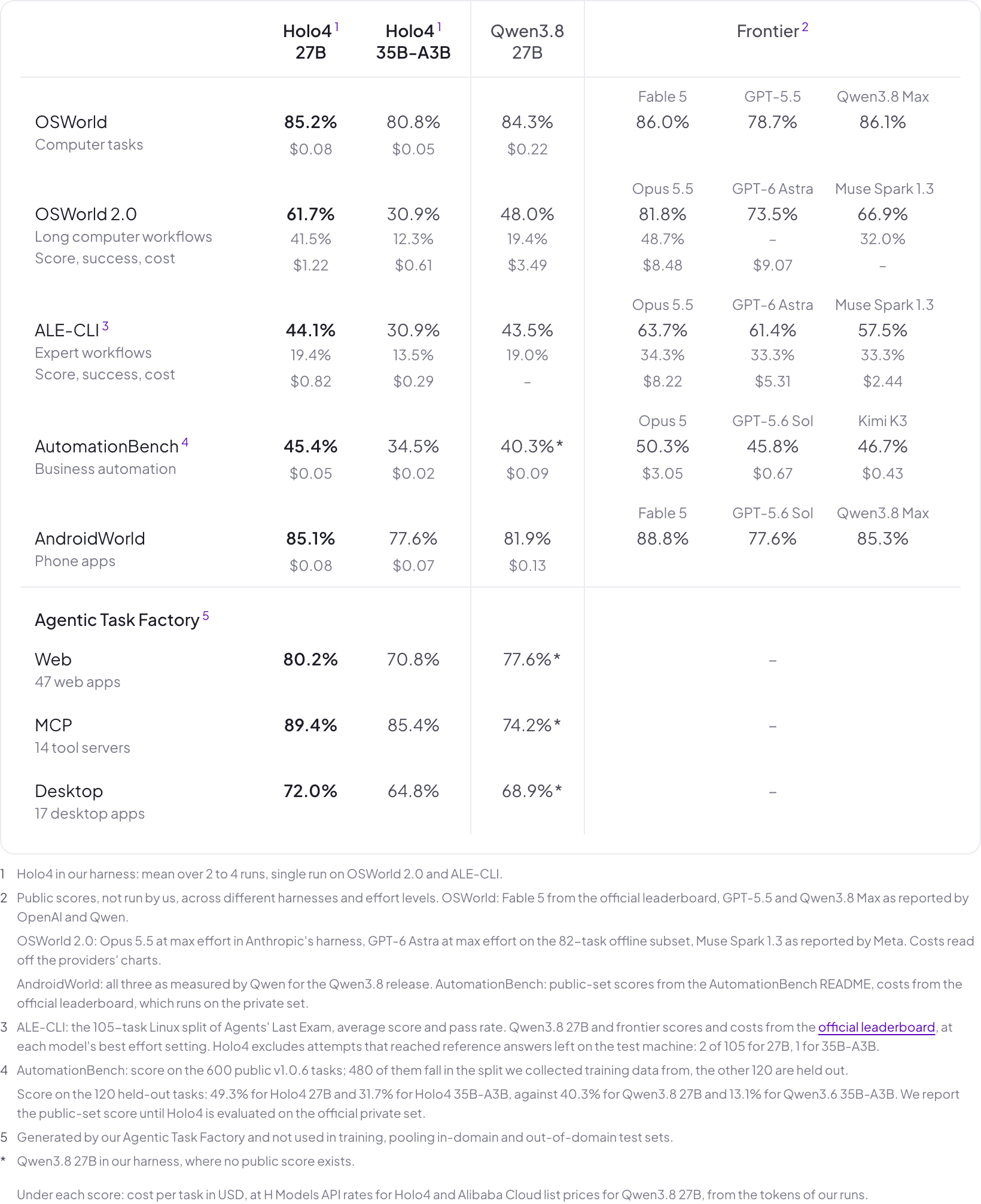
Benchmark results
Read the blog post for more tables about the benchmark results.
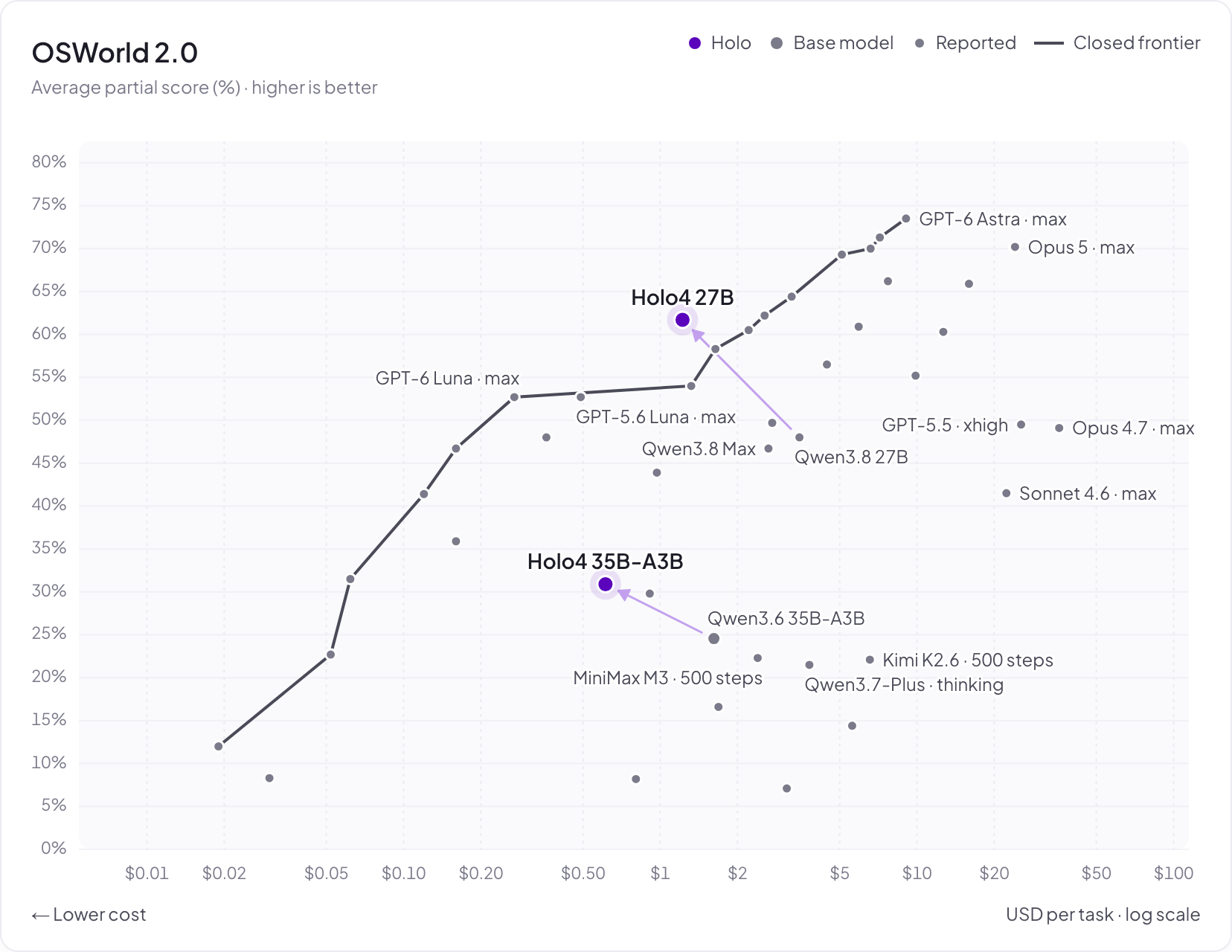
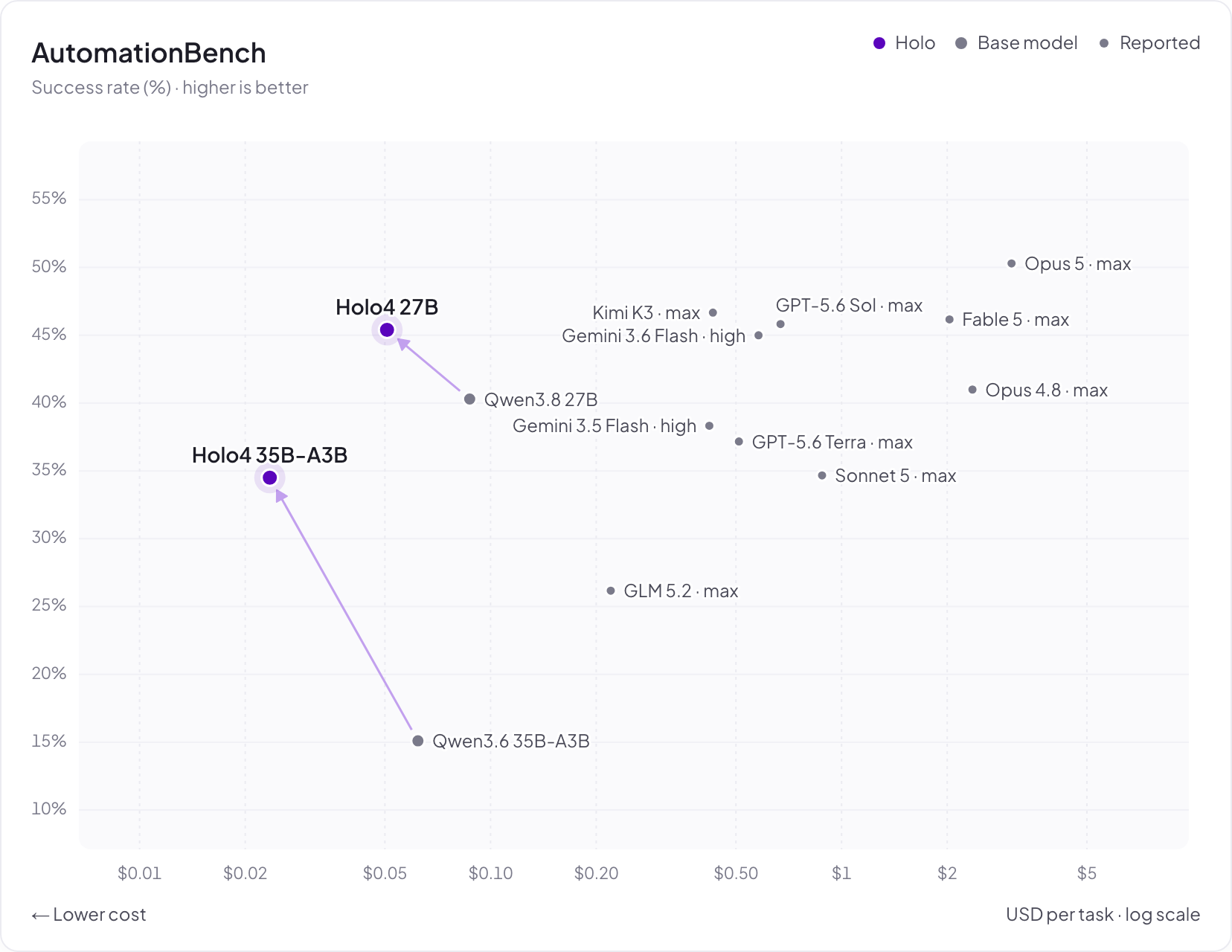
Pareto plots
These plots compare benchmark scores with cost per task. On OSWorld 2.0, Holo4-27B scores 61.7% at $1.22 per task, and Holo4-35B-A3B scores 30.9% at $0.61 per task.
On AutomationBench, Holo4-27B scores 45.4% at $0.05 per task, and Holo4-35B-A3B scores 34.5% at $0.02 per task.
Open-source evaluation traces
For transparency, we share all agent trajectories in the open-source dataset at Hcompany/trajectories.
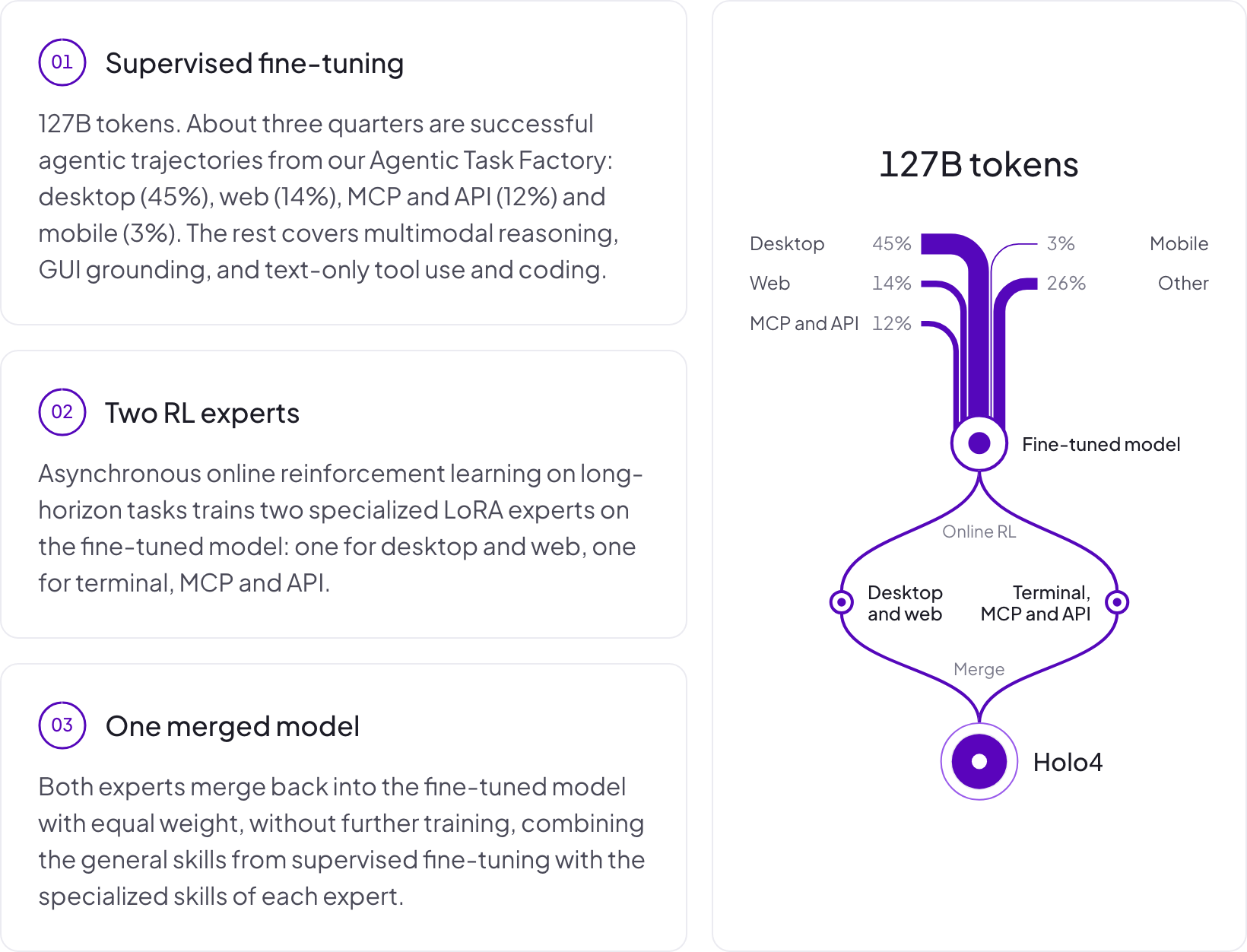
Training
License
The model weights are available under the Apache License 2.0. This model is built on Qwen3.6-35B-A3B, which Alibaba Cloud also releases under the Apache License 2.0.
- Downloads last month
- 3,335
4-bit