

K2 Horizon
Collection
K2 Horizon models, datasets, and supporting resources • 22 items • Updated • 112
K2-Horizon-32B-Stage1 is the large dense member of the K2-Horizon family: a 32B decoder-only model with a 512K context window. Note: final checkpoint to be released.
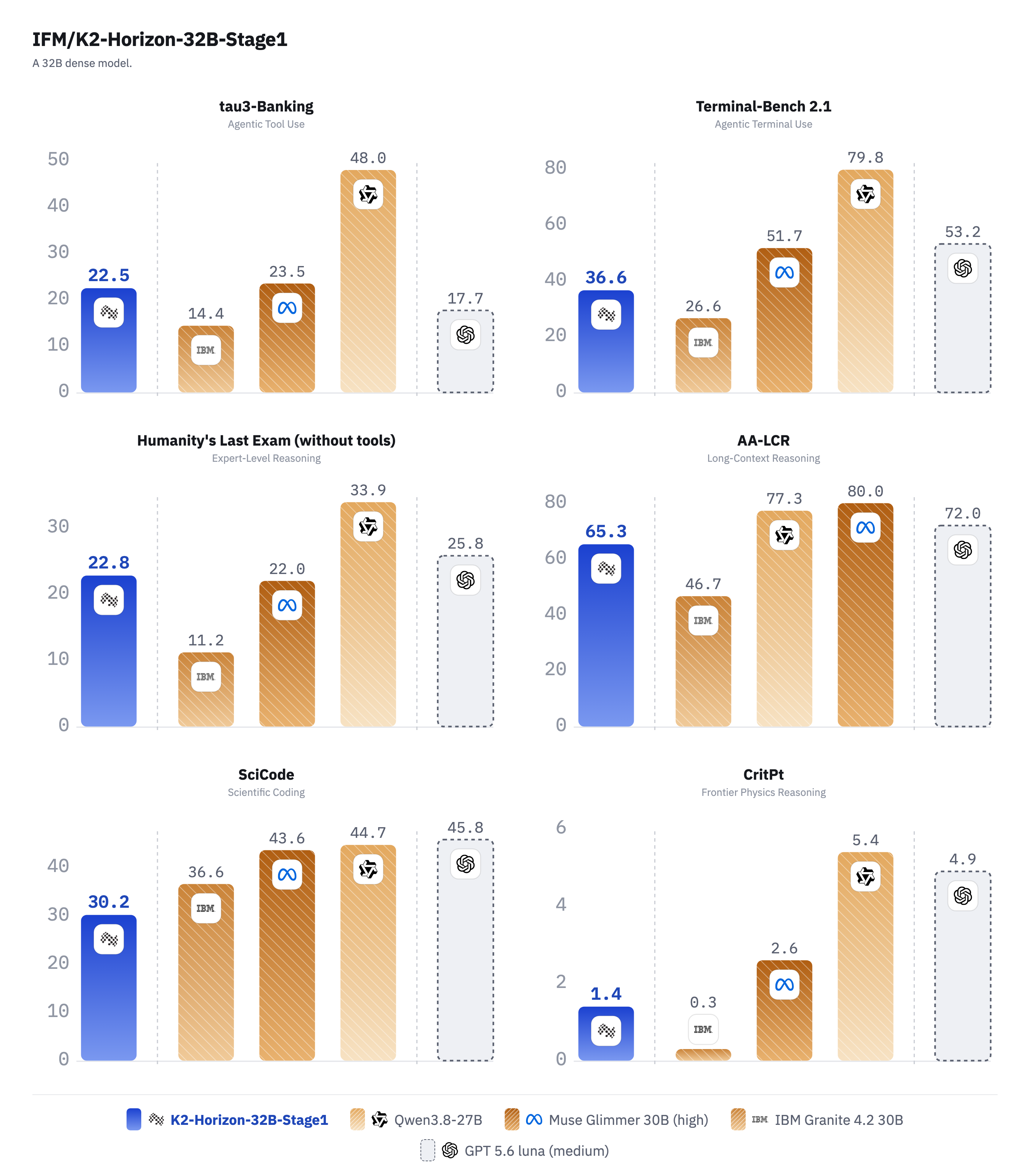
| Open-weight dense models | ||||
|---|---|---|---|---|
| K2-Horizon-32B-Stage1 | Qwen3.8-27B | Muse Glimmer-30B | IBM Granite 4.2 30B | |
| # Params | 32B | 27B | 30B | 30B |
| # Activated params | 32B | 27B | 30B | 30B |
| Architecture | Dense | Dense | Dense | Dense |
| Agents | ||||
tau3-Banking Agentic tool use | 22.5 | 48.0 | 23.5 | 14.4 |
| Coding | ||||
Terminal-Bench 2.1 Agentic terminal use | 36.6 | 79.8 | 51.7 | 26.6 |
SciCode Scientific coding | 30.2 | 44.7 | 43.6 | 36.6 |
| Scientific Reasoning | ||||
Humanity's Last Exam (without tools) Expert-level reasoning | 22.8 | 33.9 | 22.0 | 11.2 |
GPQA Diamond Graduate-level science QA | 82.3 | 90.5 | 83.5 | 64.4 |
CritPt Frontier physics reasoning | 1.4 | 5.4 | 2.6 | 0.3 |
| General | ||||
AA-LCR Long-context reasoning | 65.3 | 77.3 | 80.0 | 46.7 |
AA-Omniscience Accuracy Factual accuracy | 16.8 | 15.6 | 27.0 | 10.1 |
AA-Omniscience Non-Hallucination Non-hallucination rate | 58.3 | 69.7 | 18.1 | 74.4 |
Scores in %. Bold marks the best score in each row. Sections follow the Artificial Analysis Intelligence Index categories. Baseline scores are from Artificial Analysis; Muse Glimmer-30B at high reasoning effort, other open models in their reasoning mode.
vLLM, recipe at recipes.vllm.ai/IFM:
vllm serve IFM/K2-Horizon-32B \
--revision main \
--model-impl vllm \
--tensor-parallel-size 2 \
--trust-remote-code \
--dtype bfloat16 \
--reasoning-parser k2_horizon \
--enable-auto-tool-choice \
--tool-call-parser k2_horizon
Use an exact branch name from the inventory with vLLM's --revision option. For example, --revision pretrain_1100000 selects the final checkpoint of Pretraining, at step 1,100,000.
SGLang recipe validated on 2× H200 in the SGLang K2 Horizon cookbook:
python3 -m sglang.launch_server \
--model-path IFM/K2-Horizon-32B \
--revision main \
--tp 2 \
--dtype bfloat16 \
--attention-backend fa3 \
--reasoning-parser k2_horizon \
--tool-call-parser k2_horizon \
--host 0.0.0.0 --port 30000
Recommended settings:
reasoning_effort="high",temperature=1.0,top_p=0.95. Reasoning depth is selected per request throughchat_template_kwargs. Thinking is returned inreasoning_contentand the answer incontent.
from openai import OpenAI
client = OpenAI(base_url="http://localhost:30000/v1", api_key="EMPTY")
response = client.chat.completions.create(
model="IFM/K2-Horizon-32B",
messages=[{"role": "user", "content": "Explain the result step by step."}],
temperature=1.0,
top_p=0.95,
max_tokens=32768,
extra_body={"chat_template_kwargs": {"reasoning_effort": "high", "tool_call_format": "xml"}},
)
message = response.choices[0].message
print("Reasoning:", getattr(message, "reasoning_content", None))
print("Answer:", message.content)
Our model supports multiple tool calls formats, which can be changed with chat_template_kwargs. The supported values are json, xml, and xml_typed . The default is xml. Keep --tool-call-parser k2_horizon enabled to parse the selected format.
Validated with Transformers 5.15.0, PyTorch 2.13.0, Safetensors 0.8.0.
from transformers import AutoModelForCausalLM, AutoTokenizer
model_id = "IFM/K2-Horizon-32B"
tokenizer = AutoTokenizer.from_pretrained(model_id, trust_remote_code=True)
model = AutoModelForCausalLM.from_pretrained(
model_id, device_map="auto", dtype="bfloat16", low_cpu_mem_usage=True, trust_remote_code=True
)
inputs = tokenizer("Explain why long-context evaluation is difficult.", return_tensors="pt").to(model.device)
inputs.pop("token_type_ids", None)
outputs = model.generate(**inputs, max_new_tokens=32768, temperature=1.0, top_p=0.95, do_sample=True)
print(tokenizer.decode(outputs[0], skip_special_tokens=True))
The table below lists the training stages in order and the purpose of each stage.
Training steps are counted within each stage or phase. Token budgets cover only the additional training in that stage or phase. For example, the 50B tokens listed for SFT Phase 2 are additional to the 219B tokens in Phase 1, bringing the cumulative budget to 269B tokens by the end of Phase 2. Here, B and T denote billion and trillion tokens, respectively.
Each stage or phase continues from the final checkpoint of the preceding stage or phase.
Some stages, such as SFT, have multiple phases with slight changes to the data mix while retaining the same overall purpose.
| Training stage | Training steps | Training tokens | Sequence length | Purpose |
|---|---|---|---|---|
| Pretraining | 1100000 | 22.9T | 8K | Pretraining. |
| Midtraining — Stage 1 | 55000 | 1.1T | 32K | Context extension. |
| Midtraining — Stage 2 | 25000 | 498B | 128K | Context extension. |
| Midtraining — Stage 3 | 5500 | 110B | 512K | Context extension. |
| Midtraining — Stage 4 | 10000 | 199B | 512K | Continued context extension from Stage 3, with the data mix shifted toward agentic and reasoning SFT data. |
| SFT — Phase 1 | 11000 | 219B | 512K | SFT for better domain coverage, starting from the final checkpoint of midtraining stage 4. |
| SFT — Phase 2 | 2500 | 50B | 512K | SFT on a high-quality subset of the data used in Phase 1, with learning rate decay. |
The tables below list the release artifacts for K2-Horizon-32B, their availability, and the expected release dates for remaining items.
Last updated: 2026-09-11
Status:
| Artifact | Link | Status | Remaining items / expected availability |
|---|---|---|---|
| Model card | Hugging Face | Available | N/A |
| Training logs | W&B | Available | N/A |
| Blog post | Blog post | Available | N/A |
| Checkpoints | Checkpoint inventory | Available | See details below |
| Technical report | Not yet available | In Progress | End of September 2026 |
| Code repository | GitHub | In Progress | End of September 2026 |
Model repository: IFM/K2-Horizon-32B
Branch names below refer to this repository. Patterns containing * group branches by training stage or phase. The * is a placeholder for a training-step number, not a literal branch name. Intermediate checkpoint groups exclude the final checkpoint listed separately; a pattern does not imply that a checkpoint is available at every step.
For example, sft_1_11000 is the checkpoint saved at training step 11,000 within SFT Phase 1, and is the final checkpoint of that phase. The numeric suffix is the step within the named stage or phase, not the cumulative step across all training. Thus, sft_2_2500 refers to step 2,500 within SFT Phase 2.
For a partially released group, the available checkpoints and the remaining checkpoints are listed in the notes.
| Checkpoint | Branch / repository | Status | Remaining items / expected availability |
|---|---|---|---|
| Pretrain Intermediate Checkpoints | pretrain_* |
Available | N/A |
| Pretrain Final Checkpoint | pretrain_1100000 |
Available | N/A |
| Midtrain Stage 1 Intermediate Checkpoints | mid_1_* |
Available | N/A |
| Midtrain Stage 1 Final Checkpoint | mid_1_55000 |
Available | N/A |
| Midtrain Stage 2 Intermediate Checkpoints | mid_2_* |
Available | N/A |
| Midtrain Stage 2 Final Checkpoint | mid_2_25000 |
Available | N/A |
| Midtrain Stage 3 Intermediate Checkpoints | mid_3_* |
Available | N/A |
| Midtrain Stage 3 Final Checkpoint | mid_3_5500 |
Available | N/A |
| Midtrain Stage 4 Intermediate Checkpoints | mid_4_* |
Available | N/A |
| Midtrain Stage 4 Final Checkpoint | mid_4_10000 |
Available | N/A |
| SFT Phase 1 Intermediate Checkpoints | sft_1_* |
Available | N/A |
| SFT Phase 1 Final Checkpoint | sft_1_11000 |
Available | N/A |
| SFT Phase 2 Intermediate Checkpoints | sft_2_* |
Available | N/A |
| SFT Phase 2 Final Checkpoint | sft_2_2500 |
Available | N/A |
high. All reported results use high reasoning effort. Pass {"chat_template_kwargs": {"reasoning_effort": "high"}} on every request.temperature=1.0, top_p=0.95.k2_horizon reasoning parser for chat, and add the k2_horizon tool-call parser for agent use. Leave both off for plain completion-style generation.@misc{k2horizon2026,
title = {Introducing K2 Horizon: Frontier Performance, Radically Open},
author = {{IFM Team}},
year = {2026},
url = {https://ifm.ai/blog/k2/},
}
Install from pip and serve model
# Install vLLM from pip: pip install vllm# Start the vLLM server: vllm serve "IFM/K2-Horizon-32B"# Call the server using curl (OpenAI-compatible API): curl -X POST "http://localhost:8000/v1/chat/completions" \ -H "Content-Type: application/json" \ --data '{ "model": "IFM/K2-Horizon-32B", "messages": [ { "role": "user", "content": "What is the capital of France?" } ] }'