Instructions to use Menlo/ReZero-v0.1-llama-3.2-3b-it-grpo-250404-gguf with libraries, inference providers, notebooks, and local apps. Follow these links to get started.
- Libraries
- Transformers
How to use Menlo/ReZero-v0.1-llama-3.2-3b-it-grpo-250404-gguf with Transformers:
# pip install -U transformers accelerate # Load model directly from transformers import AutoModel model = AutoModel.from_pretrained("Menlo/ReZero-v0.1-llama-3.2-3b-it-grpo-250404-gguf", device_map="auto") - Notebooks
- Google Colab
- Kaggle
- Local Apps Settings
- llama.cpp
How to use Menlo/ReZero-v0.1-llama-3.2-3b-it-grpo-250404-gguf with llama.cpp:
Install (macOS, Linux)
curl -LsSf https://llama.app/install.sh | sh # Start a local OpenAI-compatible server with a web UI: llama serve -hf Menlo/ReZero-v0.1-llama-3.2-3b-it-grpo-250404-gguf:Q4_K_M # Run inference directly in the terminal: llama cli -hf Menlo/ReZero-v0.1-llama-3.2-3b-it-grpo-250404-gguf:Q4_K_M
Install from WinGet (Windows)
winget install llama.cpp # Start a local OpenAI-compatible server with a web UI: llama serve -hf Menlo/ReZero-v0.1-llama-3.2-3b-it-grpo-250404-gguf:Q4_K_M # Run inference directly in the terminal: llama cli -hf Menlo/ReZero-v0.1-llama-3.2-3b-it-grpo-250404-gguf:Q4_K_M
Use pre-built binary
# Download pre-built binary from: # https://github.com/ggerganov/llama.cpp/releases # Start a local OpenAI-compatible server with a web UI: ./llama-server -hf Menlo/ReZero-v0.1-llama-3.2-3b-it-grpo-250404-gguf:Q4_K_M # Run inference directly in the terminal: ./llama-cli -hf Menlo/ReZero-v0.1-llama-3.2-3b-it-grpo-250404-gguf:Q4_K_M
Build from source code
git clone https://github.com/ggerganov/llama.cpp.git cd llama.cpp cmake -B build cmake --build build -j --target llama-server llama-cli # Start a local OpenAI-compatible server with a web UI: ./build/bin/llama-server -hf Menlo/ReZero-v0.1-llama-3.2-3b-it-grpo-250404-gguf:Q4_K_M # Run inference directly in the terminal: ./build/bin/llama-cli -hf Menlo/ReZero-v0.1-llama-3.2-3b-it-grpo-250404-gguf:Q4_K_M
Use Docker
docker model run hf.co/Menlo/ReZero-v0.1-llama-3.2-3b-it-grpo-250404-gguf:Q4_K_M
- LM Studio
- Jan
- Ollama
How to use Menlo/ReZero-v0.1-llama-3.2-3b-it-grpo-250404-gguf with Ollama:
ollama run hf.co/Menlo/ReZero-v0.1-llama-3.2-3b-it-grpo-250404-gguf:Q4_K_M
- Unsloth Desktop
- Pi
How to use Menlo/ReZero-v0.1-llama-3.2-3b-it-grpo-250404-gguf with Pi:
Start the llama.cpp server
# Install llama.cpp: brew install llama.cpp # Start a local OpenAI-compatible server: llama serve -hf Menlo/ReZero-v0.1-llama-3.2-3b-it-grpo-250404-gguf:Q4_K_M
Configure the model in Pi
# Install Pi: npm install -g @earendil-works/pi-coding-agent # Add to ~/.pi/agent/models.json: { "providers": { "llama-cpp": { "baseUrl": "http://localhost:8080/v1", "api": "openai-completions", "apiKey": "none", "models": [ { "id": "Menlo/ReZero-v0.1-llama-3.2-3b-it-grpo-250404-gguf:Q4_K_M" } ] } } }Run Pi
# Start Pi in your project directory: pi
- Docker Model Runner
How to use Menlo/ReZero-v0.1-llama-3.2-3b-it-grpo-250404-gguf with Docker Model Runner:
docker model run hf.co/Menlo/ReZero-v0.1-llama-3.2-3b-it-grpo-250404-gguf:Q4_K_M
- Lemonade
How to use Menlo/ReZero-v0.1-llama-3.2-3b-it-grpo-250404-gguf with Lemonade:
Pull the model
# Download Lemonade from https://lemonade-server.ai/ lemonade pull Menlo/ReZero-v0.1-llama-3.2-3b-it-grpo-250404-gguf:Q4_K_M
Run and chat with the model
lemonade run user.ReZero-v0.1-llama-3.2-3b-it-grpo-250404-gguf-Q4_K_M
List all available models
lemonade list
- Hermes Agent
How to use Menlo/ReZero-v0.1-llama-3.2-3b-it-grpo-250404-gguf with Hermes Agent:
Start the llama.cpp server
# Install llama.cpp: brew install llama.cpp # Start a local OpenAI-compatible server: llama serve -hf Menlo/ReZero-v0.1-llama-3.2-3b-it-grpo-250404-gguf:Q4_K_M
Configure Hermes
# Install Hermes: curl -fsSL https://hermes-agent.nousresearch.com/install.sh | bash hermes setup # Point Hermes at the local server: hermes config set model.provider custom hermes config set model.base_url http://127.0.0.1:8080/v1 hermes config set model.default Menlo/ReZero-v0.1-llama-3.2-3b-it-grpo-250404-gguf:Q4_K_M
Run Hermes
hermes
- Atomic Chat
- OpenClaw
How to use Menlo/ReZero-v0.1-llama-3.2-3b-it-grpo-250404-gguf with OpenClaw:
Start the llama.cpp server
# Install llama.cpp: brew install llama.cpp # Start a local OpenAI-compatible server: llama serve -hf Menlo/ReZero-v0.1-llama-3.2-3b-it-grpo-250404-gguf:Q4_K_M
Configure OpenClaw
# Install OpenClaw: npm install -g openclaw@latest # Register the local server and set it as the default model: openclaw onboard --non-interactive --mode local \ --auth-choice custom-api-key \ --custom-base-url http://127.0.0.1:8080/v1 \ --custom-model-id "Menlo/ReZero-v0.1-llama-3.2-3b-it-grpo-250404-gguf:Q4_K_M" \ --custom-provider-id llama-cpp \ --custom-compatibility openai \ --custom-text-input \ --accept-risk \ --skip-health
Run OpenClaw
openclaw agent --local --agent main --message "Hello from Hugging Face"
ReZero: Enhancing LLM search ability by trying one-more-time
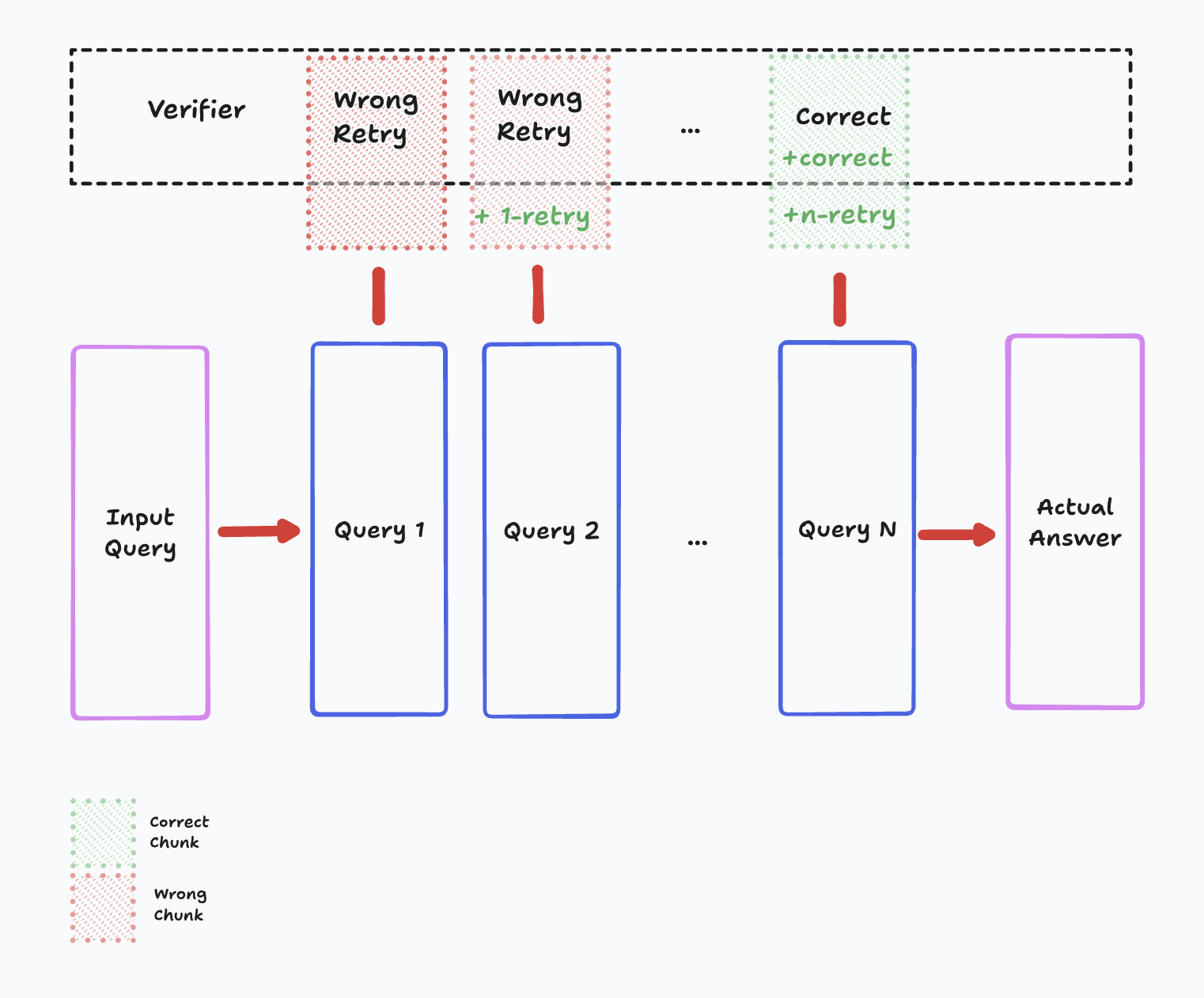
ReZero trains a small language model to develop effective search behaviors instead of memorizing static data. It interacts with multiple synthetic search engines, each with unique retrieval mechanisms, to refine queries and persist in searching until it finds exact answers. The project focuses on reinforcement learning, preventing overfitting, and optimizing for efficiency in real-world search applications.
Quick Demo 🚀
Run the interactive web interface to see ReZero in action:
python app.py
This will launch a Gradio interface where you can interact with the model and test different search behaviors.
Setup 🛠️
# Clone the repository
git clone https://github.com/menloresearch/ReZero
cd ReZero
# Create virtual environment
python -m venv .venv
# Activate the environment
source .venv/bin/activate
# Install dependencies
pip install --upgrade pip
pip install -e .
# Set up environment variables (required for websearch demo)
cp .env.example .env
# Edit .env and add your Tavily API key if you want to use the websearch demo
Data and Training 🧠
All necessary training data is included in the data/ folder. To train:
python train_grpo.py
If you want to regenerate the data, please run:
python scripts/generate_data.py
Models 🤖
You can find our models on Hugging Face 🤗! We're committed to open-source and easy access for the research community.
| Model | Backbone | Size | Link | GGUF |
|---|---|---|---|---|
| ReZero-v0.1 | Llama-3.2-3B | 3B | 🤗 Menlo/ReZero-v0.1-llama-3.2-3b-it-grpo-250404 | 🤗 GGUF |
Experiments 🧪
| Run ID | Model Config | Dataset | Steps | Hardware | TensorBoard | Description |
|---|---|---|---|---|---|---|
| exp-01 | Llama-3.2-3b-instruct | Apollo Mission Report | 300 | ~2 hours on 1xH200 | 📊 | Added reward_search_strategy and reward_search_quality. Reward weights: [4.0, 2.0, 1.0, 1.0, 1.0, 1.0]. Loss crashed after step 400. Best accuracy: 31.25% at step 400. Max agent turns: 10. |
| exp-02 | Llama-3.2-3b-instruct | Apollo Mission Report | 1000 | ~7 hours on 1xH200 | 📊 | Improved reward_retry logic to only reward search when answers found. Increased max agent turns to 20. Reward weights: [4.0, 2.0, 1.0, 1.0, 1.0, 1.0]. Best accuracy: 46.88% at step 250. Higher early reward_correctness (~0.6 vs 0.4-0.5). Loss stable but reward crashed after step 350. |
| exp-03 | Llama-3.2-3b-instruct | Apollo Mission Report | 1000 | ~7 hours on 1xH200 | 📊 | Same as exp-02 but without the retry reward function. |
References 📖
arxiv.org/abs/2504.11001
Acknowledgements 🤝
- This project is kickstarted from the source code of AutoDidact
- Downloads last month
- 47
4-bit
Model tree for Menlo/ReZero-v0.1-llama-3.2-3b-it-grpo-250404-gguf
Base model
meta-llama/Llama-3.2-3B-Instruct