Video-Text-to-Text
Transformers
Safetensors
English
Chinese
moss_vl
feature-extraction
MOSS-VL
realtime
streaming
video-understanding
FP8
compressed-tensors
HQQ
quantized
custom_code
Instructions to use OpenMOSS-Team/MOSS-VL-Realtime-FP8 with libraries, inference providers, notebooks, and local apps. Follow these links to get started.
- Libraries
- Transformers
How to use OpenMOSS-Team/MOSS-VL-Realtime-FP8 with Transformers:
# pip install -U transformers accelerate # Load model directly from transformers import AutoModel model = AutoModel.from_pretrained("OpenMOSS-Team/MOSS-VL-Realtime-FP8", trust_remote_code=True, device_map="auto") - Notebooks
- Google Colab
- Kaggle
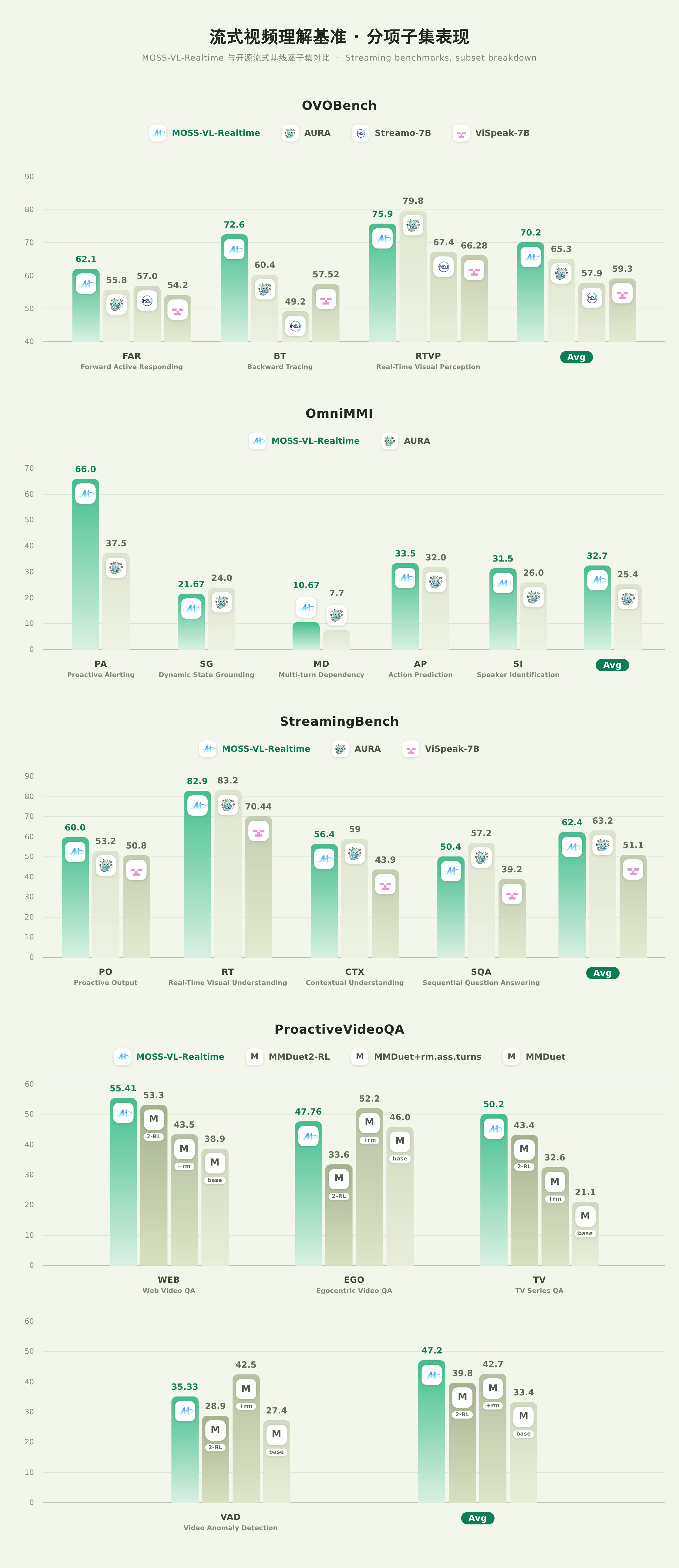
Download assets/benchmark-streaming.png from OpenMOSS-Team/MOSS-VL-Realtime-FP8: direct link, hf CLI and curl.
- Browser
- Download file 1.07 MB
-
https://huggingface.co/OpenMOSS-Team/MOSS-VL-Realtime-FP8/resolve/main/assets/benchmark-streaming.png
- Command line
-
hf download hf://OpenMOSS-Team/MOSS-VL-Realtime-FP8/assets/benchmark-streaming.png
-
curl -L -o benchmark-streaming.png https://huggingface.co/OpenMOSS-Team/MOSS-VL-Realtime-FP8/resolve/main/assets/benchmark-streaming.png
1.07 MB

- Xet hash:
- b44d1ff1f5c62412e377430646d407780c19ad137de4d8cfdcdc7d89cece9c70
- Size of remote file:
- 1.07 MB
- SHA256:
- 7366164e8e0b8cca177659d9d595219923b4bd8ecfc0ca2d1d77b42f3abb258c
·
Xet efficiently stores Large Files inside Git, intelligently splitting files into unique chunks and accelerating uploads and downloads. More info.