Image-Text-to-Text
MLX
Safetensors
gemma4_unified
apple-silicon
multimodal
text-classification
image-classification
typed-decision
conversational
4-bit precision
Instructions to use Ruiruiz30/Jev-Omni-MLX-4bit with libraries, inference providers, notebooks, and local apps. Follow these links to get started.
- Libraries
- MLX
How to use Ruiruiz30/Jev-Omni-MLX-4bit with MLX:
# Make sure mlx-vlm is installed # pip install --upgrade mlx-vlm from mlx_vlm import load, generate from mlx_vlm.prompt_utils import apply_chat_template from mlx_vlm.utils import load_config # Load the model model, processor = load("Ruiruiz30/Jev-Omni-MLX-4bit") config = load_config("Ruiruiz30/Jev-Omni-MLX-4bit") # Prepare input image = ["http://images.cocodataset.org/val2017/000000039769.jpg"] prompt = "Describe this image." # Apply chat template formatted_prompt = apply_chat_template( processor, config, prompt, num_images=1 ) # Generate output output = generate(model, processor, formatted_prompt, image) print(output) - Notebooks
- Google Colab
- Kaggle
- Local Apps Settings
- LM Studio
- Pi
How to use Ruiruiz30/Jev-Omni-MLX-4bit with Pi:
Start the MLX server
# Install MLX LM: uv tool install mlx-lm # Start a local OpenAI-compatible server: mlx_lm.server --model "Ruiruiz30/Jev-Omni-MLX-4bit"
Configure the model in Pi
# Install Pi: npm install -g @earendil-works/pi-coding-agent # Add to ~/.pi/agent/models.json: { "providers": { "mlx-lm": { "baseUrl": "http://localhost:8080/v1", "api": "openai-completions", "apiKey": "none", "models": [ { "id": "Ruiruiz30/Jev-Omni-MLX-4bit" } ] } } }Run Pi
# Start Pi in your project directory: pi
- Hermes Agent
How to use Ruiruiz30/Jev-Omni-MLX-4bit with Hermes Agent:
Start the MLX server
# Install MLX LM: uv tool install mlx-lm # Start a local OpenAI-compatible server: mlx_lm.server --model "Ruiruiz30/Jev-Omni-MLX-4bit"
Configure Hermes
# Install Hermes: curl -fsSL https://hermes-agent.nousresearch.com/install.sh | bash hermes setup # Point Hermes at the local server: hermes config set model.provider custom hermes config set model.base_url http://127.0.0.1:8080/v1 hermes config set model.default Ruiruiz30/Jev-Omni-MLX-4bit
Run Hermes
hermes
- Atomic Chat
- OpenClaw
How to use Ruiruiz30/Jev-Omni-MLX-4bit with OpenClaw:
Start the MLX server
# Install MLX LM: uv tool install mlx-lm # Start a local OpenAI-compatible server: mlx_lm.server --model "Ruiruiz30/Jev-Omni-MLX-4bit"
Configure OpenClaw
# Install OpenClaw: npm install -g openclaw@latest # Register the local server and set it as the default model: openclaw onboard --non-interactive --mode local \ --auth-choice custom-api-key \ --custom-base-url http://127.0.0.1:8080/v1 \ --custom-model-id "Ruiruiz30/Jev-Omni-MLX-4bit" \ --custom-provider-id mlx-lm \ --custom-compatibility openai \ --custom-text-input \ --accept-risk \ --skip-health
Run OpenClaw
openclaw agent --local --agent main --message "Hello from Hugging Face"
|
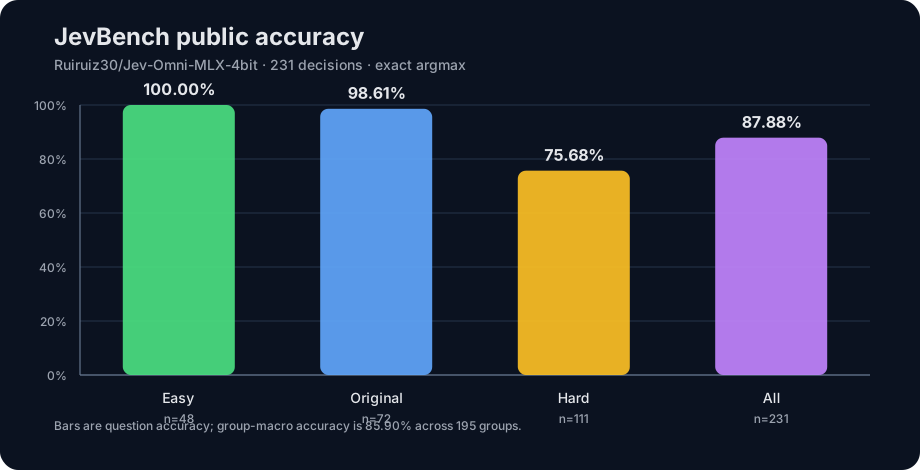
Download assets/jevbench-accuracy.svg from Ruiruiz30/Jev-Omni-MLX-4bit: direct link, hf CLI and curl.
- Browser
- Download file 3.18 kB
-
https://huggingface.co/Ruiruiz30/Jev-Omni-MLX-4bit/resolve/main/assets/jevbench-accuracy.svg
- Command line
-
hf download hf://Ruiruiz30/Jev-Omni-MLX-4bit/assets/jevbench-accuracy.svg
-
curl -L -o jevbench-accuracy.svg https://huggingface.co/Ruiruiz30/Jev-Omni-MLX-4bit/resolve/main/assets/jevbench-accuracy.svg
3.18 kB
| <svg xmlns="http://www.w3.org/2000/svg" width="920" height="470" viewBox="0 0 920 470" preserveAspectRatio="xMinYMin meet" overflow="hidden"> | |
| <title>JevBench public accuracy for Jev-Omni-MLX-4bit</title> | |
| <rect width="100%" height="100%" rx="18" fill="#0b1220"/> | |
| <style> | |
| text { font-family: -apple-system, BlinkMacSystemFont, "Segoe UI", sans-serif; fill: #e5e7eb; } | |
| .muted { fill: #9ca3af; } .grid { stroke: #263449; stroke-width: 1; } | |
| .axis { stroke: #64748b; stroke-width: 1.2; } .value { font-weight: 700; } | |
| </style> | |
| <text x="54" y="45" font-size="24" font-weight="700">JevBench public accuracy</text> | |
| <text x="54" y="70" font-size="14" class="muted">Ruiruiz30/Jev-Omni-MLX-4bit · 231 decisions · exact argmax</text> | |
| <line x1="80" y1="375.0" x2="870" y2="375.0" class="grid"/> | |
| <text x="66" y="380.0" text-anchor="end" font-size="12" class="muted">0%</text> | |
| <line x1="80" y1="321.0" x2="870" y2="321.0" class="grid"/> | |
| <text x="66" y="326.0" text-anchor="end" font-size="12" class="muted">20%</text> | |
| <line x1="80" y1="267.0" x2="870" y2="267.0" class="grid"/> | |
| <text x="66" y="272.0" text-anchor="end" font-size="12" class="muted">40%</text> | |
| <line x1="80" y1="213.0" x2="870" y2="213.0" class="grid"/> | |
| <text x="66" y="218.0" text-anchor="end" font-size="12" class="muted">60%</text> | |
| <line x1="80" y1="159.0" x2="870" y2="159.0" class="grid"/> | |
| <text x="66" y="164.0" text-anchor="end" font-size="12" class="muted">80%</text> | |
| <line x1="80" y1="105.0" x2="870" y2="105.0" class="grid"/> | |
| <text x="66" y="110.0" text-anchor="end" font-size="12" class="muted">100%</text> | |
| <line x1="80" y1="105" x2="80" y2="375" class="axis"/> | |
| <line x1="80" y1="375" x2="870" y2="375" class="axis"/> | |
| <rect x="122.8" y="105.0" width="112" height="270.0" rx="8" fill="#4ade80" opacity="0.92"/> | |
| <text x="178.8" y="95.0" text-anchor="middle" font-size="16" class="value">100.00%</text> | |
| <text x="178.8" y="403" text-anchor="middle" font-size="14">Easy</text> | |
| <text x="178.8" y="423" text-anchor="middle" font-size="12" class="muted">n=48</text> | |
| <rect x="320.2" y="108.8" width="112" height="266.2" rx="8" fill="#60a5fa" opacity="0.92"/> | |
| <text x="376.2" y="98.8" text-anchor="middle" font-size="16" class="value">98.61%</text> | |
| <text x="376.2" y="403" text-anchor="middle" font-size="14">Original</text> | |
| <text x="376.2" y="423" text-anchor="middle" font-size="12" class="muted">n=72</text> | |
| <rect x="517.8" y="170.7" width="112" height="204.3" rx="8" fill="#fbbf24" opacity="0.92"/> | |
| <text x="573.8" y="160.7" text-anchor="middle" font-size="16" class="value">75.68%</text> | |
| <text x="573.8" y="403" text-anchor="middle" font-size="14">Hard</text> | |
| <text x="573.8" y="423" text-anchor="middle" font-size="12" class="muted">n=111</text> | |
| <rect x="715.2" y="137.7" width="112" height="237.3" rx="8" fill="#c084fc" opacity="0.92"/> | |
| <text x="771.2" y="127.7" text-anchor="middle" font-size="16" class="value">87.88%</text> | |
| <text x="771.2" y="403" text-anchor="middle" font-size="14">All</text> | |
| <text x="771.2" y="423" text-anchor="middle" font-size="12" class="muted">n=231</text> | |
| <text x="54" y="430" font-size="12" class="muted">Bars are question accuracy; group-macro accuracy is 85.90% across 195 groups.</text> | |
| </svg> |