

Lumina 1.0 (by ButterFly AI Labs) 🦋
Lumina 1.0 is a next-generation, lightweight text-to-image model developed by ButterFly AI Labs. Fine-tuned on top of the classic Stable Diffusion 1.5 architecture, it is meticulously optimized to deliver high-quality, modern aesthetics and sharp details while drastically reducing computational overhead.
True to our mission of creating accessible AI tools, Lumina 1.0 demonstrates that high-performance media generation doesn't require massive budgets or enterprise-level clusters.
📊 Model Specifications & Technical Details
- Base Model: Stable Diffusion 1.5 (U-Net architecture)
- Total Parameters: ~1.2 Billion (highly efficient, ideal for consumer hardware and edge devices)
- Training Cost: Just $7.50 USD 💰 (Achieved via advanced compute optimization, low-rank adaptation techniques, and a highly curated dataset)
- Target Resolution: 512x512 pixels (native), scaling exceptionally well with modern upscalers.
- Primary Focus: Fast rendering, lower VRAM consumption, and enhanced prompt responsiveness.
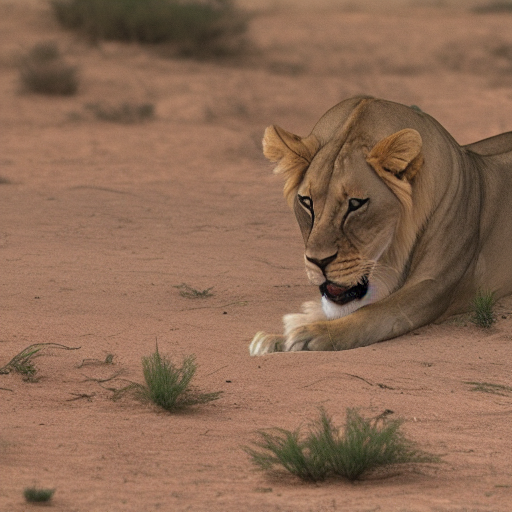
🎨 Lumina 1.0 Generation Examples
| 🦋 Example 1 | 🌆 Example 2 | 🦄 Example 3 |
|---|---|---|
 |
 |
 |
| Prompt: Red car | Prompt: Lion in the desert | Prompt: Beautiful house in Jungles |
⚙️ Recommended Generation Settings
To get the best possible results out of Lumina 1.0, we highly recommend using the following parameters:
- Resolution: 512x512 pixels (Native)
- Sampling Steps: 30 steps
- CFG Scale (Prompt Guidance): 7.5
- Sampler: Euler a, DPM++ 2M Karras, or UniPC
⚠️ Important Note on Quality: Please keep in mind that Lumina 1.0 is built on an older model architecture (Stable Diffusion 1.5). While it is extremely lightweight, fast, and cost-efficient, the raw generation quality, fine text rendering, and complex anatomies may be lower or less detailed compared to modern, multi-billion-parameter heavyweights like SD3 or Flux. For the best outcomes, we recommend using modern upscalers (Hi-Res Fix) or face-restoration tools.
🚀 How to Use (with Diffusers)
You can easily run Lumina 1.0 using the diffusers library:
from diffusers import StableDiffusionPipeline
import torch

pipe = StableDiffusionPipeline.from_pretrained("ButterFly-AI-Labs/your-model-name", torch_dtype=torch.float16)
pipe = pipe.to("cuda")

prompt = "A cinematic, highly detailed photograph of a butterfly wings glowing in the dark, neon cyberpunk style"
image = pipe(prompt).images[0]
image.save("lumina_output.png")
- Downloads last month
- 10