

Quantized 4-bit models
Collection
Large model quantized with post-quantization performance very close to the original models, allowing it to run on reasonable infrastructure. • 9 items • Updated • 1
docker run --gpus all \
--shm-size 32g \
-p 30000:30000 \
-v ~/.cache/huggingface:/root/.cache/huggingface \
--env "HF_TOKEN=<secret>" \
--ipc=host \
lmsysorg/sglang:latest \
python3 -m sglang.launch_server \
--model-path "cmarkea/CodeLlama-70b-hf-4bit" \
--host 0.0.0.0 \
--port 30000# Call the server using curl (OpenAI-compatible API):
curl -X POST "http://localhost:30000/v1/completions" \
-H "Content-Type: application/json" \
--data '{
"model": "cmarkea/CodeLlama-70b-hf-4bit",
"prompt": "Once upon a time,",
"max_tokens": 512,
"temperature": 0.5
}'Converted version of CodeLlama-70b to 4-bit using bitsandbytes. For more information about the model, refer to the model's page.
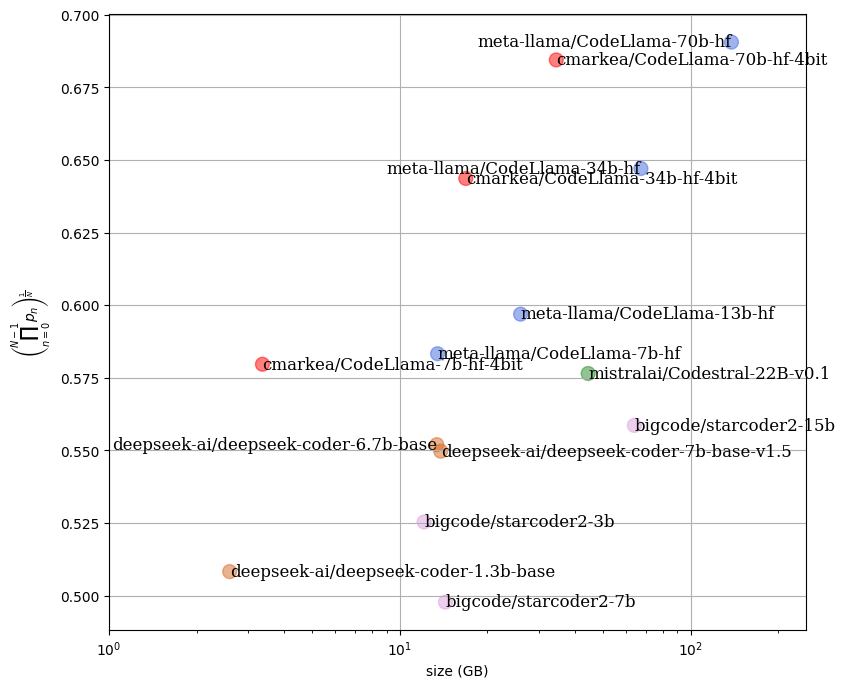
In the following figure, we can see the impact on the performance of a set of models relative to the required RAM space. It is noticeable that the quantized models have equivalent performance while providing a significant gain in RAM usage.
Install from pip and serve model
# Install SGLang from pip: pip install sglang# Start the SGLang server: python3 -m sglang.launch_server \ --model-path "cmarkea/CodeLlama-70b-hf-4bit" \ --host 0.0.0.0 \ --port 30000# Call the server using curl (OpenAI-compatible API): curl -X POST "http://localhost:30000/v1/completions" \ -H "Content-Type: application/json" \ --data '{ "model": "cmarkea/CodeLlama-70b-hf-4bit", "prompt": "Once upon a time,", "max_tokens": 512, "temperature": 0.5 }'