


Utonia
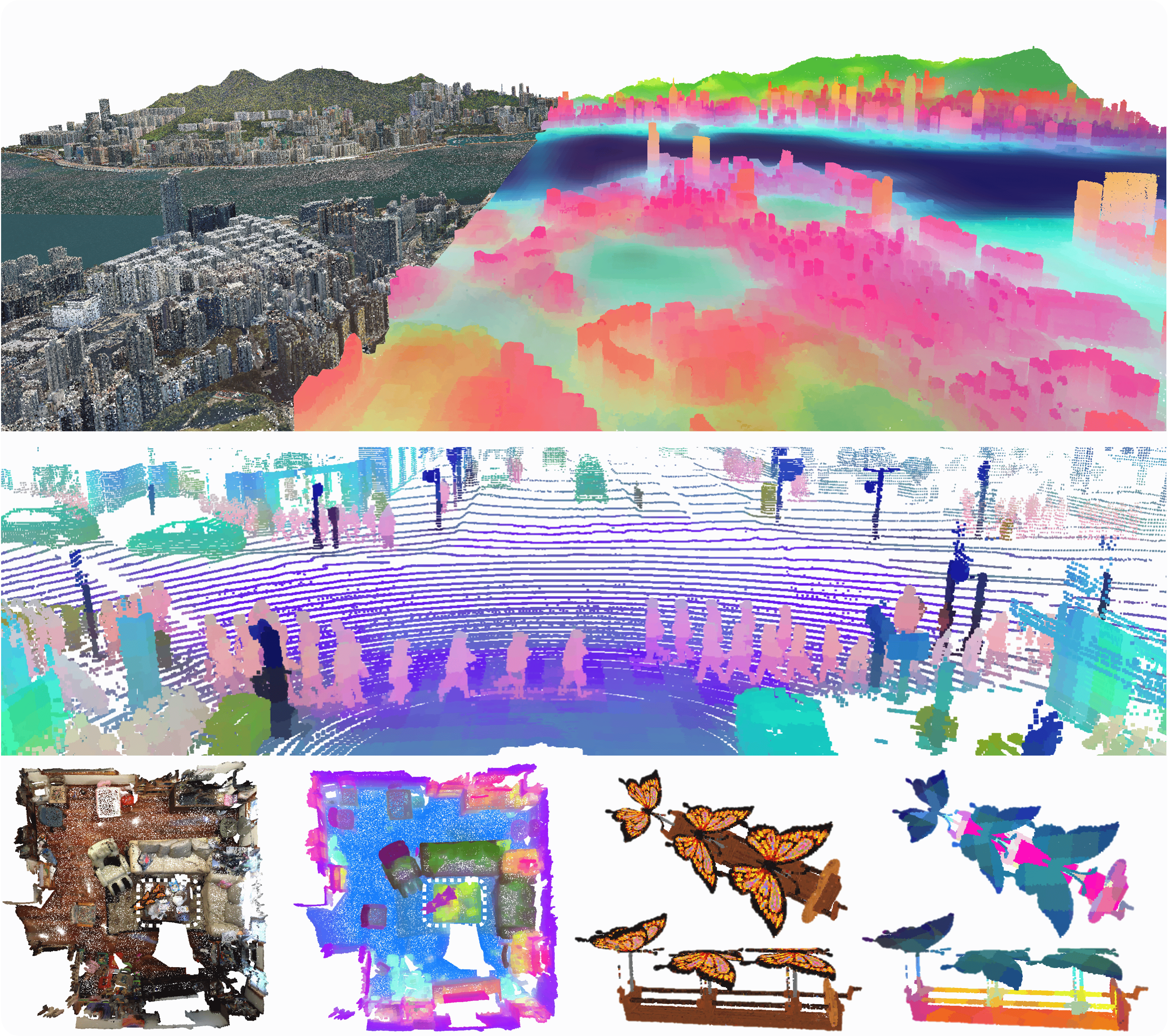
This repo is the official training codebase of the paper Utonia: Toward One Encoder for All Point Clouds. Utonia is a step toward one-from-all and one-for-all point cloud encoder, developed from Concerto and Sonata. It pretrains a single encoder on diverse point cloud data and reuses it as a reliable backbone for downstream tasks.
We recommend beginning with our inference demo, and the data transform process is different from Concerto and Sonata. This section is designed for users interested in reproducing our pre-training.
Quick start
1. Installation
Follow the instructions here.
2. Dataset
Besides the same indoor and outdoor point cloud datasets as Concerto, Utonia includes object datasets into pretraining. Each dataset has image assets and their correspondence to point clouds if available (HKRemote, ScanObjectNN, PartNet lack image information).
The standard data is organized as follows:
└── Default Dataset
    ├── images
    │   ├── train
    │   │   ├── color
    │   │   ├── correspondence
    │   │   ├── depth (optional)
    │   │   ├── intrinsic
    │   │   └── pose
    │   ├── val
    │   └── test
    ├── splits
    │   ├── train.json
    │   ├── val.json
    │   └── test.json
    ├── train
    ├── val
    └── test
The color, correspondence, depth, intrinsic, and pose folders contain RGB images, point cloud correspondences, depth maps, camera intrinsics, and camera poses, respectively. The train.json, val.json, and test.json files in the splits folder provide the indices for the training, validation, and test splits.
For the intrinsic folder, if only a single file is presented, it indicates that all images share the same intrinsic parameters. If multiple files exist, each corresponds to a different image. In the case of the HM3D dataset, where camera parameters are simulated, all images share identical intrinsics across the entire dataset.
2.1 [Option A] Preprocess Dataset from Scratch
For those who wish to do data preprocessing locally, please follow the instructions below:
2.1.1 Indoor Datasets
If you do not have the point cloud datasets for Sonata, you can process the next step without any modification. If you have already downloaded the processed Sonata datasets below, you can remove "-c" in the next step to only output image assets.
Now you can follow the instructions below to processe the image assets.
- ScanNet v2
- Download the ScanNet v2 dataset.
- Run preprocessing code for raw ScanNet as follows:
# RAW_SCANNET_DIR: the directory of downloaded ScanNet v2 raw dataset. PROCESSED_SCANNET_DIR: the directory of the processed ScanNet dataset (output dir). # Use -p to parse depths of the selected images. bash pointcept/datasets/preprocessing/concerto/scannet/preprocess_scannet.sh -d ${RAW_SCANNET_DIR} -o ${PROCESSED_SCANNET_DIR} -n ${NUM_WORKERS} -c # To generate the JSON file for the Concerto dataloader python pointcept/datasets/preprocessing/concerto/scannet/splits.py --dataset_root ${PROCESSED_SCANNET_DIR} - ScanNet++
- Download the ScanNet++ dataset.
- Run preprocessing code for raw ScanNet++ as follows:
# For Concerto, we use the unsplitted point cloud data. There is no need to split the large scene because we crop the scenes in code according to the selected camera views. # RAW_SCANNETPP_DIR: the directory of downloaded ScanNet++ raw dataset. PROCESSED_SCANNETPP_DIR: the directory of the processed ScanNet++ dataset (output dir). # Use -p to parse depths of the selected images. bash pointcept/datasets/preprocessing/concerto/scannetpp/preprocess_scannetpp.sh -d ${RAW_SCANNETPP_DIR} -o ${PROCESSED_SCANNETPP_DIR} -n ${NUM_WORKERS} -c # To generate the JSON file for the Concerto dataloader python pointcept/datasets/preprocessing/concerto/scannetpp/splits.py --dataset_root ${PROCESSED_SCANNETPP_DIR} - S3DIS
- Download S3DIS data by filling this Google form. Download the
Stanford3dDataset_v1.2.zipfile and unzip it. - Fix error in
Area_5/office_19/Annotations/ceilingLine 323474 (103.0�0000 => 103.000000). - (Optional) Download Full 2D-3D S3DIS dataset (no XYZ) from here for parsing normal.
- Run preprocessing code for S3DIS as follows:
# Default not use --align_angle # S3DIS_DIR: the directory of downloaded Stanford3dDataset_v1.2 dataset. RAW_S3DIS_DIR: the directory of the Stanford2d3dDataset_noXYZ dataset. PROCESSED_S3DIS_DIR: the directory of the processed S3DIS dataset (output dir). # Use -p to parse depths of the selected images. bash pointcept/datasets/preprocessing/concerto/s3dis/preprocess_s3dis.sh -d ${S3DIS_DIR} -r ${RAW_S3DIS_DIR} -o ${PROCESSED_S3DIS_DIR} -c # To generate the JSON file for the Concerto dataloader python pointcept/datasets/preprocessing/concerto/s3dis/splits.py --dataset_root ${PROCESSED_S3DIS_DIR} - Download S3DIS data by filling this Google form. Download the
- ARKitScenes
- Download ArkitScenes 3DOD split with the following commands:
# RAW_AS_DIR: the directory of downloaded Raw ArkitScenes dataset. git clone https://github.com/apple/ARKitScenes.git cd ARKitScenes python download_data.py 3dod --download_dir $RAW_AS_DIR --video_id_csv threedod/3dod_train_val_splits.csv- Run preprocessing code for ArkitScenes as follows:
# RAW_AS_DIR: the directory of the downloaded ARKitScenes dataset. PROCESSED_AS_DIR: the directory of processed ArkitScenes dataset (output dir). # NUM_WORKERS: Number of workers for preprocessing, default same as CPU count (might OOM). # Use -p to parse depths of the selected images. bash pointcept/datasets/preprocessing/concerto/arkitscenes/preprocess_arkitscenes.sh -d ${RAW_AS_DIR} -o ${PROCESSED_AS_DIR} -n ${NUM_WORKERS} -c # To generate the JSON file for the Concerto dataloader python pointcept/datasets/preprocessing/concerto/arkitscenes/splits.py --dataset_root ${PROCESSED_ARKITSCENES_DIR} - Habitat - Matterport 3D (HM3D)
- Download HM3D
hm3d-train-glb-v0.2.tarandhm3d-val-glb-v0.2.tarwith instuction here and unzip them. - Run preprocessing code for HM3D as follows:
# We leverage the Habitat-Sim to simulate the camera views. The detailed installation for Habitat-Sim can be found at Habitat-Sim(https://github.com/facebookresearch/habitat-sim) # RAW_HM_DIR: the directory of downloaded HM3D dataset. PROCESSED_HM_DIR: the directory of processed HM3D dataset (output dir). # NUM_WORKERS: Number of workers for preprocessing, default same as CPU count (might OOM). # Use -p to parse depths of the selected images. bash pointcept/datasets/preprocessing/concerto/hm3d/preprocess_hm3d.sh -d ${RAW_HM3D_DIR} -o ${PROCESSED_HM3D_DIR} -n ${NUM_WORKERS} -c # To generate the JSON file for the Concerto dataloader python pointcept/datasets/preprocessing/concerto/hm3d/splits.py --dataset_root ${PROCESSED_HM3D_DIR} - Download HM3D
- Structured3D
- Download Structured3D panorama related and perspective (full) related zip files by filling this Google form (no need to unzip them).
- Organize all downloaded zip file in one folder (
${STRUCT3D_DIR}). - Run preprocessing code for Structured3D as follows:
# RAW_STRUCT3D_DIR: the directory of downloaded Structured3D dataset. PROCESSED_STRUCT3D_DIR: the directory of processed Structured3D dataset (output dir). # NUM_WORKERS: Number of workers for preprocessing, default same as CPU count (might OOM). # Use -p to parse depths of the selected images. bash pointcept/datasets/preprocessing/concerto/structured3d/preprocess_structured3d.sh -d ${RAW_STRUCT3D_DIR} -o ${PROCESSED_STRUCT3D_DIR} -n ${NUM_WORKERS} -c # To generate the JSON file for the Concerto dataloader python pointcept/datasets/preprocessing/concerto/structured3d/splits.py --dataset_root ${PROCESSED_STRUCT3D_DIR} - RealEstate10K (RE10K)
Additionally, we leverage video lifted RE10K by VGGT. Currently, the python file below only supports single data inference through VGGT. However, it is OK for you to start several python processes by setting num_workers and thread_id.
- Install VGGT as a package
git clone https://github.com/facebookresearch/vggt.git pip install -e .- Download RealEstate10K inPixelSplat format[ Here]
- Preprocess the RE10K dataset
# RAW_RE10K_DIR: the directory of downloaded RE10K dataset. # PROCESSED_RE10K_DIR: the directory of processed RE10K dataset (output dir). # using --parse_depths in the shell script to parse depths of the selected images. python pointcept/datasets/preprocessing/concerto/re10k/preprocess_re10k.py --dataset_root ${RAW_RE10K_DIR} --output_root ${PROCESSED_RE10K_DIR} --num_workers ${NUM_WORKERS} --thread_id ${THREAD_ID} # To generate the JSON file for the Concerto dataloader python pointcept/datasets/preprocessing/concerto/re10k/splits.py --dataset_root ${PROCESSED_RE10K_DIR} - After all the preprocessing, link processed dataset above to the codebase.
# PROCESSED_DIR: the directory of the processed dataset (output dir). # DATASET_NAME: the dataset name, which should be consistent with 'data_root' in the corresponding config, such as scannet, scannetpp, s3dis, arkitscenes, hm3d, structured3d, re10k, semantic_kitti, nuscenes, waymo mkdir data ln -s ${PROCESSED_DIR} ${CODEBASE_DIR}/data/${DATASET_NAME}- ScanNet v2
2.1.2 Outdoor Datasets
Follow the instructions below to processe the outdoor datasets.
SemanticKITTI
- Download SemanticKITTI dataset.
- SemanticKitti does not need any preprocessing.
# SEMANTIC_KITTI_DIR: the directory of SemanticKITTI dataset.
# |- SEMANTIC_KITTI_DIR
#   |- dataset
#     |- sequences
#       |- 00
#       |- 01
#       |- ...
nuScenes
- Download the official NuScene dataset (with Lidar Segmentation) and organize the downloaded files as follows:
NUSCENES_DIR │── samples │── sweeps │── lidarseg ... │── v1.0-trainval │── v1.0-test- Run information preprocessing code (modified from OpenPCDet) for nuScenes as follows:
# NUSCENES_DIR: the directory of downloaded nuScenes dataset. # PROCESSED_NUSCENES_DIR: the directory of processed nuScenes dataset (output dir). # MAX_SWEEPS: Max number of sweeps. Default: 10. pip install nuscenes-devkit pyquaternion python pointcept/datasets/preprocessing/concerto/nuscenes/preprocess_nuscenes_info.py --dataset_root ${NUSCENES_DIR} --output_root ${PROCESSED_NUSCENES_DIR} --max_sweeps ${MAX_SWEEPS} --with_camera- Link raw dataset to processed NuScene dataset folder:
# NUSCENES_DIR: the directory of downloaded nuScenes dataset.
# PROCESSED_NUSCENES_DIR: the directory of processed nuScenes dataset (output dir).
ln -s ${NUSCENES_DIR} {PROCESSED_NUSCENES_DIR}/raw
then the processed nuscenes folder is organized as follows:
nuscene
|── raw
    │── samples
    │── sweeps
    │── lidarseg
    ...
    │── v1.0-trainval
    │── v1.0-test
|── info
Waymo
- Download the official Waymo dataset (v1.4.3) and organize the downloaded files as follows:
WAYMO_RAW_DIR │── training │── validation │── testing- Install the following dependence:
# If shows "No matching distribution found", download whl directly from Pypi and install the package. conda create -n waymo python=3.10 -y conda activate waymo pip install waymo-open-dataset-tf-2-12-0- Run the preprocessing code as follows:
# WAYMO_DIR: the directory of the downloaded Waymo dataset.
# PROCESSED_WAYMO_DIR: the directory of the processed Waymo dataset (output dir).
# NUM_WORKERS: num workers for preprocessing
bash pointcept/datasets/preprocessing/concerto/waymo/preprocess_waymo.sh -d ${WAYMO_DIR} -o ${PROCESSED_WAYMO_DIR} -n ${NUM_WORKERS} -s "training validation"
# To generate the JSON file for the Concerto dataloader
python pointcept/datasets/preprocessing/concerto/waymo/splits.py --dataset_root ${PROCESSED_WAYMO_DIR}
HK Remote
- Download the official data using script at
pointcept/datasets/preprocessing/concerto/hk/hkremote_download.shand unzip all the .zip files to ${HK_3D_MAPS}. - Run the preprocessing code as follows:
# HK_3D_MAPS_DIR: the directory of the downloaded HK Remote dataset. # PROCESSED_HK_DIR: the directory of the processed Waymo dataset (output dir). # NUM_WORKERS: num workers for preprocessing bash pointcept/datasets/preprocessing/concerto/hk/preprocess_hk.sh -d ${HK_3D_MAPS_DIR} -o ${PROCESSED_HK_DIR} -n ${NUM_WORKERS} python pointcept/datasets/preprocessing/concerto/hk/splits.py --dataset_root ${PROCESSED_HK_DIR}- Download the official data using script at
After all the preprocessing, link processed dataset above to the codebase.
# PROCESSED_DIR: the directory of the processed dataset (output dir).
# DATASET_NAME: the dataset name, which should be consistent with 'data_root' in the corresponding config, such as scannet, scannetpp, s3dis, arkitscenes, hm3d, structured3d, re10k, semantic_kitti, nuscenes, waymo
mkdir data
ln -s ${PROCESSED_DIR} ${CODEBASE_DIR}/data/${DATASET_NAME}
2.1.3 Object Datasets
- Cap3D
- Download the Cap3D dataset to ${RAW_CAP3D_DIR}.
- Run preprocessing code for Cap3D as follows to produce the correspondence between images and point clouds:
# RAW_CAP3D_DIR: the directory of downloaded Cap3D raw dataset.
# CORRESPONDENCE_CAP3D_DIR: the directory of the correspondence between images and point clouds.
# NUM_WORKERS: num workers for preprocessing
bash pointcept/datasets/preprocessing/concerto/cap3d/preprocess_cap3d.sh -c ${RAW_CAP3D_DIR}/misc/RenderedImage_CamMatrix_zips -p ${RAW_CAP3D_DIR}/misc/PointCloud_pt_zips -o ${CORRESPONDENCE_CAP3D_DIR} -n ${NUM_WORKERS}
# To generate the JSON file for the Concerto dataloader
ln -s ${CORRESPONDENCE_CAP3D_DIR} data/cap3d/correspondences
ln -s ${RAW_CAP3D_DIR}/misc/PointCloud_pt_zips/Cap3D_pcs_pt data/cap3d/train
ln -s ${RAW_CAP3D_DIR}/RenderedImage_perobj_zips/Cap3D_Objaverse_renderimgs data/cap3d/images/train
python pointcept/datasets/preprocessing/concerto/cap3d/splits.py --dataset_root data/cap3d
The data directory will be like:
└── Cap3D Dataset ├── images │ └── train ├── correspondences ├── splits │ └── train.json └── train - GraspNet
- Download the GraspNet dataset, including both train and test. and unzip them to ${GRASPNET_DATASET_DIR}
- Run the preprocessing code as follows:
python pointcept/datasets/preprocessing/concerto/graspnet/preprocess_graspnet_poses.py --dataset_root ${GRASPNET_DATASET_DIR}
python pointcept/datasets/preprocessing/concerto/graspnet/splits.py --dataset_root ${GRASPNET_DATASET_DIR}
ln -s ${GRASPNET_DATASET_DIR} data/graspnet
The data directory will be like:
└── GraspNet Dataset ├── splits │ ├── train.json │ └── val.json └── scenes - ParNet
- Download the PartNet dataset, including
data_v0.zipand unzip it to ${PARTNET_DATA_0_DIR}.
mkdir data/partnet_data_v0 ln -s ${PARTNET_DATA_0_DIR} data/partnet_data_v0/train - Download the PartNet dataset, including
- ScanObjectNN
- Download the ScanObjectNN dataset, including
h5_files.zipandraw/object_dataset.zip. Unzip them to ${BENCHMARK_SCANOBJECTNN_DIR} and ${RAW_SCANOBJECTNN_DIR}
ln -s ${BENCHMARK_SCANOBJECTNN_DIR} data/scanobject_eval mkdir data/scanobject_raw ln -s ${RAW_SCANOBJECTNN_DIR} data/scanobject_raw/train - Download the ScanObjectNN dataset, including
2.2 [Option B] Download Preprocessed Dataset
You can download the preprocessed indoor datasets from Huggingface. Other datasets are currently not ready. The downloaded datasets should be put in the folders named after the ${DATASET_NAME}, which is the string in front of .tar.gz.
- ScanNet v2 - [ here ]
- ScanNet++ v2 - [ here ]
- S3DIS - [ here ]
- ArkitScenes - [ here ]
- HM3D - [ here ]
- Structured3D - [ here ]
- RE10K - [ here ]
Then you need to decompress the tar.gz using:
cat ${DATASET_NAME}/${DATASET_NAME}.tar.gz.* | tar -xzvf -
After decompressing, link processed dataset above to the codebase.
# PROCESSED_DIR: the directory of the processed dataset (output dir).
# DATASET_NAME: the dataset name, which should be consistent with 'data_root' in the corresponding config, such as scannet, scannetpp, s3dis, arkitscenes, hm3d, structured3d, re10k, semantic_kitti, nuscenes, waymo
mkdir data
ln -s ${PROCESSED_DIR} ${CODEBASE_DIR}/data/${DATASET_NAME}
3. Pre-training
Enable pre-training with 32 GPUs (can be adjusted according to your hardware resources) by running the following script:
# default config stage 1
sh scripts/train.sh -m 8 -g 8 -d utonia -c pretrain-utonia-v1m1-0-base_stagev1 -n pretrain-utonia-v1m1-0-base_stagev1

# default config stage 2
sh scripts/train.sh -m 8 -g 8 -d utonia -c pretrain-utonia-v1m1-0-base_stagev2 -n pretrain-utonia-v1m1-0-base_stagev2 -w exp/utonia/pretrain-utonia-v1m1-0-base_stagev1/model/model_last.pth

# (or) if OOM
# half the batch size and half the base learning rate

# (or) if Nan appears
# try making grad clip lower as 2.0 or 1.0
# try making enable_amp=False
4. Probing and Tuning
Our pre-trained model weight can be downloaded here. The original probing and fine-tuning scripts are designed for locally pretrained weight. For the utonia.pth on HuggingFace, replace the lines below in the config to correctly load the model weight:
dict(
        type="CheckpointLoader",
        keywords="module.student.backbone",
        replacement="module.backbone",
    ),
to
dict(
        type="CheckpointLoader",
        keywords="module",
        replacement="module.backbone",
    ),
Or directly, use pretrain-utonia-v1m1-0-base.pth without any modification.
Here are the example commands for probing and tuning on large model:
# Assume the pre-trained experiment is recorded in:
# exp/utonia/pretrain-utonia-v1m1-0-base_stagev2/model/model_last.pth

# ModelNet40
# linear probing
sh scripts/train.sh -m 1 -g 8 -d utonia -c cls-utonia-v1m1-7a-modelnet40-lin -n cls-utonia-v1m1-7a-modelnet40-lin -w exp/utonia/pretrain-utonia-v1m1-0-base_stagev2/model/model_last.pth
# full fine-tuning
sh scripts/train.sh -m 1 -g 8 -d utonia -c cls-utonia-v1m1-7b-modelnet40-ft -n cls-utonia-v1m1-7b-modelnet40-ft -w exp/utonia/pretrain-utonia-v1m1-0-base_stagev2/model/model_last.pth

# ScanObjectNN
sh scripts/train.sh -m 1 -g 8 -d utonia -c cls-utonia-v1m1-8a-scanobjectnn-lin -n cls-utonia-v1m1-8a-scanobjectnn-lin -w exp/utonia/pretrain-utonia-v1m1-0-base_stagev2/model/model_last.pth
sh scripts/train.sh -m 1 -g 8 -d utonia -c cls-utonia-v1m1-8b-scanobjectnn-ft -n cls-utonia-v1m1-8b-scanobjectnn-ft -w exp/utonia/pretrain-utonia-v1m1-0-base_stagev2/model/model_last.pth
sh scripts/train.sh -m 1 -g 8 -d utonia -c cls-utonia-v1m1-8c-scanobjectnn-lin_hard -n cls-utonia-v1m1-8c-scanobjectnn-lin_hard -w exp/utonia/pretrain-utonia-v1m1-0-base_stagev2/model/model_last.pth
sh scripts/train.sh -m 1 -g 8 -d utonia -c cls-utonia-v1m1-8d-scanobjectnn-ft_hard -n cls-utonia-v1m1-8d-scanobjectnn-ft_hard -w exp/utonia/pretrain-utonia-v1m1-0-base_stagev2/model/model_last.pth

# ShapeNetPart
sh scripts/train.sh -m 1 -g 8 -d utonia -c partseg-utonia-v1m1-9a-shapenet-lin -n partseg-utonia-v1m1-9a-shapenet-lin -w exp/utonia/pretrain-utonia-v1m1-0-base_stagev2/model/model_last.pth
sh scripts/train.sh -m 1 -g 8 -d utonia -c partseg-utonia-v1m1-9b-shapenet-ft -n partseg-utonia-v1m1-9b-shapenet-ft -w exp/utonia/pretrain-utonia-v1m1-0-base_stagev2/model/model_last.pth

# PartNetE
sh scripts/train.sh -m 1 -g 8 -d utonia -c partseg-utonia-v1m1-10a-partnete-lin -n partseg-utonia-v1m1-10a-partnete-lin -w exp/utonia/pretrain-utonia-v1m1-0-base_stagev2/model/model_last.pth
sh scripts/train.sh -m 1 -g 8 -d utonia -c partseg-utonia-v1m1-10b-partnete-ft -n partseg-utonia-v1m1-10b-partnete-ft -w exp/utonia/pretrain-utonia-v1m1-0-base_stagev2/model/model_last.pth

# ScanNet
# linear probing
sh scripts/train.sh -m 1 -g 8 -d utonia -c semseg-utonia-v1m1-0a-scannet-lin -n semseg-utonia-v1m1-0a-scannet-lin -w exp/utonia/pretrain-utonia-v1m1-0-base_stagev2/model/model_last.pth
# decoder probing
sh scripts/train.sh -m 1 -g 8 -d utonia -c semseg-utonia-v1m1-0b-scannet-dec -n semseg-utonia-v1m1-0b-scannet-dec -w exp/utonia/pretrain-utonia-v1m1-0-base_stagev2/model/model_last.pth
# full fine-tuning
sh scripts/train.sh -m 1 -g 8 -d utonia -c semseg-utonia-v1m1-0c-scannet-ft -n semseg-utonia-v1m1-0c-scannet-ft -w exp/utonia/pretrain-utonia-v1m1-0-base_stagev2/model/model_last.pth
# w/o color
sh scripts/train.sh -m 1 -g 8 -d utonia -c semseg-utonia-v1m1-0d-scannet-nocolor-lin -n semseg-utonia-v1m1-0d-scannet-nocolor-lin -w exp/utonia/pretrain-utonia-v1m1-0-base_stagev2/model/model_last.pth
sh scripts/train.sh -m 1 -g 8 -d utonia -c semseg-utonia-v1m1-0e-scannet-nocolor-dec -n semseg-utonia-v1m1-0e-scannet-nocolor-dec -w exp/utonia/pretrain-utonia-v1m1-0-base_stagev2/model/model_last.pth
sh scripts/train.sh -m 1 -g 8 -d utonia -c semseg-utonia-v1m1-0f-scannet-nocolor-ft -n semseg-utonia-v1m1-0f-scannet-nocolor-ft -w exp/utonia/pretrain-utonia-v1m1-0-base_stagev2/model/model_last.pth
# w/o normal
sh scripts/train.sh -m 1 -g 8 -d utonia -c semseg-utonia-v1m1-0g-scannet-nonormal-lin -n semseg-utonia-v1m1-0g-scannet-nonormal-lin -w exp/utonia/pretrain-utonia-v1m1-0-base_stagev2/model/model_last.pth
sh scripts/train.sh -m 1 -g 8 -d utonia -c semseg-utonia-v1m1-0h-scannet-nonormal-dec -n semseg-utonia-v1m1-0h-scannet-nonormal-dec -w exp/utonia/pretrain-utonia-v1m1-0-base_stagev2/model/model_last.pth
sh scripts/train.sh -m 1 -g 8 -d utonia -c semseg-utonia-v1m1-0i-scannet-nonormal-ft -n semseg-utonia-v1m1-0i-scannet-nonormal-ft -w exp/utonia/pretrain-utonia-v1m1-0-base_stagev2/model/model_last.pth

# ScanNet200
sh scripts/train.sh -m 1 -g 8 -d utonia -c semseg-utonia-v1m1-1a-scannet200-lin -n semseg-utonia-v1m1-1a-scannet200-lin -w exp/utonia/pretrain-utonia-v1m1-0-base_stagev2/model/model_last.pth
sh scripts/train.sh -m 1 -g 8 -d utonia -c semseg-utonia-v1m1-1b-scannet200-dec -n semseg-utonia-v1m1-1b-scannet200-dec -w exp/utonia/pretrain-utonia-v1m1-0-base_stagev2/model/model_last.pth
sh scripts/train.sh -m 1 -g 8 -d utonia -c semseg-utonia-v1m1-1c-scannet200-ft -n semseg-utonia-v1m1-1c-scannet200-ft -w exp/utonia/pretrain-utonia-v1m1-0-base_stagev2/model/model_last.pth

# ScanNetpp
sh scripts/train.sh -m 1 -g 8 -d utonia -c semseg-utonia-v1m1-2a-scannetpp-lin -n semseg-utonia-v1m1-2a-scannetpp-lin -w exp/utonia/pretrain-utonia-v1m1-0-base_stagev2/model/model_last.pth
sh scripts/train.sh -m 1 -g 8 -d utonia -c semseg-utonia-v1m1-2b-scannetpp-dec -n semseg-utonia-v1m1-2b-scannetpp-dec -w exp/utonia/pretrain-utonia-v1m1-0-base_stagev2/model/model_last.pth
sh scripts/train.sh -m 1 -g 8 -d utonia -c semseg-utonia-v1m1-2c-scannetpp-ft -n semseg-utonia-v1m1-2c-scannetpp-ft -w exp/utonia/pretrain-utonia-v1m1-0-base_stagev2/model/model_last.pth

# S3DIS Area 5
sh scripts/train.sh -m 1 -g 8 -d utonia -c semseg-utonia-v1m1-3a-s3dis-lin -n semseg-utonia-v1m1-3a-s3dis-lin -w exp/utonia/pretrain-utonia-v1m1-0-base_stagev2/model/model_last.pth
sh scripts/train.sh -m 1 -g 8 -d utonia -c semseg-utonia-v1m1-3b-s3dis-dec -n semseg-utonia-v1m1-3b-s3dis-dec -w exp/utonia/pretrain-utonia-v1m1-0-base_stagev2/model/model_last.pth
sh scripts/train.sh -m 1 -g 8 -d utonia -c semseg-utonia-v1m1-3c-s3dis-ft -n semseg-utonia-v1m1-3c-s3dis-ft -w exp/utonia/pretrain-utonia-v1m1-0-base_stagev2/model/model_last.pth

# NuScenes
sh scripts/train.sh -m 1 -g 8 -d utonia -c semseg-utonia-v1m1-4a-nuscenes-lin -n semseg-utonia-v1m1-4a-nuscenes-lin -w exp/utonia/pretrain-utonia-v1m1-0-base_stagev2/model/model_last.pth
sh scripts/train.sh -m 1 -g 8 -d utonia -c semseg-utonia-v1m1-4b-nuscenes-dec -n semseg-utonia-v1m1-4b-nuscenes-dec -w exp/utonia/pretrain-utonia-v1m1-0-base_stagev2/model/model_last.pth
sh scripts/train.sh -m 1 -g 8 -d utonia -c semseg-utonia-v1m1-4c-nuscenes-ft -n semseg-utonia-v1m1-4c-nuscenes-ft -w exp/utonia/pretrain-utonia-v1m1-0-base_stagev2/model/model_last.pth
# w/o color
sh scripts/train.sh -m 1 -g 8 -d utonia -c semseg-utonia-v1m1-4d-nuscenes-nocolor-lin -n semseg-utonia-v1m1-0d-scannet-nocolor-lin -w exp/utonia/pretrain-utonia-v1m1-0-base_stagev2/model/model_last.pth
sh scripts/train.sh -m 1 -g 8 -d utonia -c semseg-utonia-v1m1-4e-nuscenes-nocolor-dec -n semseg-utonia-v1m1-4e-nuscenes-nocolor-dec -w exp/utonia/pretrain-utonia-v1m1-0-base_stagev2/model/model_last.pth
sh scripts/train.sh -m 1 -g 8 -d utonia -c semseg-utonia-v1m1-4f-nuscenes-nocolor-ft -n semseg-utonia-v1m1-4f-nuscenes-nocolor-ft -w exp/utonia/pretrain-utonia-v1m1-0-base_stagev2/model/model_last.pth
# w/o normal
sh scripts/train.sh -m 1 -g 8 -d utonia -c semseg-utonia-v1m1-4g-nuscenes-nonormal-lin -n semseg-utonia-v1m1-4g-nuscenes-nonormal-lin -w exp/utonia/pretrain-utonia-v1m1-0-base_stagev2/model/model_last.pth
sh scripts/train.sh -m 1 -g 8 -d utonia -c semseg-utonia-v1m1-4h-nuscenes-nonormal-dec -n semseg-utonia-v1m1-4h-nuscenes-nonormal-dec -w exp/utonia/pretrain-utonia-v1m1-0-base_stagev2/model/model_last.pth
sh scripts/train.sh -m 1 -g 8 -d utonia -c semseg-utonia-v1m1-4i-nuscenes-nonormal-ft -n semseg-utonia-v1m1-4i-nuscenes-nonormal-ft -w exp/utonia/pretrain-utonia-v1m1-0-base_stagev2/model/model_last.pth

# Waymo
sh scripts/train.sh -m 1 -g 8 -d utonia -c semseg-utonia-v1m1-5a-waymo-lin -n semseg-utonia-v1m1-5a-waymo-lin -w exp/utonia/pretrain-utonia-v1m1-0-base_stagev2/model/model_last.pth
sh scripts/train.sh -m 1 -g 8 -d utonia -c semseg-utonia-v1m1-5b-waymo-dec -n semseg-utonia-v1m1-5b-waymo-dec -w exp/utonia/pretrain-utonia-v1m1-0-base_stagev2/model/model_last.pth
sh scripts/train.sh -m 1 -g 8 -d utonia -c semseg-utonia-v1m1-5c-waymo-ft -n semseg-utonia-v1m1-5c-waymo-ft -w exp/utonia/pretrain-utonia-v1m1-0-base_stagev2/model/model_last.pth

# Kitti
sh scripts/train.sh -m 1 -g 8 -d utonia -c semseg-utonia-v1m1-6a-kitti-lin -n semseg-utonia-v1m1-6a-kitti-lin -w exp/utonia/pretrain-utonia-v1m1-0-base_stagev2/model/model_last.pth
sh scripts/train.sh -m 1 -g 8 -d utonia -c semseg-utonia-v1m1-6b-kitti-dec -n semseg-utonia-v1m1-6b-kitti-dec -w exp/utonia/pretrain-utonia-v1m1-0-base_stagev2/model/model_last.pth
sh scripts/train.sh -m 1 -g 8 -d utonia -c semseg-utonia-v1m1-6c-kitti-ft -n semseg-utonia-v1m1-6c-kitti-ft -w exp/utonia/pretrain-utonia-v1m1-0-base_stagev2/model/model_last.pth
The above configs have not been verified with one additional run. If you encounter any problems, please feel free to let me know. Also, comparing changes between each configuration would be helpful in handling the configuration system of Pointcept.
5. Distillation
Here, we provide some distillation examples:
# you can adjust the backbone size according to your requirements, replace the "teacher_pretrained_path" in the configs with the path of "pretrain-utonia-v1m1-0-base" on the huggingface.
# we here provide the distillation with DINO branch in Concerto. Also youcan also try pure Sonata distillation. The model is in pointcept/models/sonata/sonata_v1m3_distill.py
sh scripts/train.sh -m 4 -g 8 -d utonia -c distill-utonia-v1m2-0-tiny -n distill-utonia-v1m2-0-tiny
sh scripts/train.sh -m 4 -g 8 -d utonia -c distill-utonia-v1m2-1-small -n distill-utonia-v1m2-1-small
Citation
If you find Utonia useful to your research, please consider citing our line of works as an acknowledgment. (੭ˊ꒳ˋ)੭✧
@misc{zhang2026utonia,
      title={Utonia: Toward One Encoder for All Point Clouds},
      author={Yujia Zhang and Xiaoyang Wu and Yunhan Yang and Xianzhe Fan and Han Li and Yuechen Zhang and Zehao Huang and Naiyan Wang and Hengshuang Zhao},
      year={2026},
      eprint={2603.03283},
      archivePrefix={arXiv},
      primaryClass={cs.CV},
      url={https://arxiv.org/abs/2603.03283},
}
@inproceedings{zhang2025concerto,
  title={Concerto: Joint 2D-3D Self-Supervised Learning Emerges Spatial Representations},
  author={Zhang, Yujia and Wu, Xiaoyang and Lao, Yixing and Wang, Chengyao and Tian, Zhuotao and Wang, Naiyan and Zhao, Hengshuang},
  booktitle={NeurIPS},
  year={2025}
}
@inproceedings{wu2025sonata,
    title={Sonata: Self-Supervised Learning of Reliable Point Representations},
    author={Wu, Xiaoyang and DeTone, Daniel and Frost, Duncan and Shen, Tianwei and Xie, Chris and Yang, Nan and Engel, Jakob and Newcombe, Richard and Zhao, Hengshuang and Straub, Julian},
    booktitle={CVPR},
    year={2025}
}
@inproceedings{wu2024ptv3,
    title={Point Transformer V3: Simpler, Faster, Stronger},
    author={Wu, Xiaoyang and Jiang, Li and Wang, Peng-Shuai and Liu, Zhijian and Liu, Xihui and Qiao, Yu and Ouyang, Wanli and He, Tong and Zhao, Hengshuang},
    booktitle={CVPR},
    year={2024}
}
@inproceedings{wu2024ppt,
    title={Towards Large-scale 3D Representation Learning with Multi-dataset Point Prompt Training},
    author={Wu, Xiaoyang and Tian, Zhuotao and Wen, Xin and Peng, Bohao and Liu, Xihui and Yu, Kaicheng and Zhao, Hengshuang},
    booktitle={CVPR},
    year={2024}
}
@inproceedings{wu2023masked,
  title={Masked Scene Contrast: A Scalable Framework for Unsupervised 3D Representation Learning},
  author={Wu, Xiaoyang and Wen, Xin and Liu, Xihui and Zhao, Hengshuang},
  journal={CVPR},
  year={2023}
}
@inproceedings{wu2022ptv2,
    title={Point transformer V2: Grouped Vector Attention and Partition-based Pooling},
    author={Wu, Xiaoyang and Lao, Yixing and Jiang, Li and Liu, Xihui and Zhao, Hengshuang},
    booktitle={NeurIPS},
    year={2022}
}
@misc{pointcept2023,
    title={Pointcept: A Codebase for Point Cloud Perception Research},
    author={Pointcept Contributors},
    howpublished={\url{https://github.com/Pointcept/Pointcept}},
    year={2023}
}
License
- Utonia code is based on Sonata, which is released by Meta under the Apache 2.0 license,
- Utonia weight is released under the CC-BY-NC 4.0 license (restricted by NC of datasets like HM3D, ArkitScenes).
- For commercial usage, please removing datasets restrict by non-commercial license.