

🚨⚠️ I HAVE REACHED HUGGING FACE'S FREE STORAGE LIMIT ⚠️🚨
I can no longer upload new models unless I can cover the cost of additional storage.
I host 70+ free models as an independent contributor and this work is unpaid.
Without your support, no more new models can be uploaded.
Every contribution goes directly toward Hugging Face storage fees to keep models free for everyone.
94% fewer refusals (6/100 Uncensored vs 97/100 Original) while preserving model quality (0.0300 KL divergence).
❤️ Support My Work
Creating these models takes significant time, work and compute. If you find them useful consider supporting me:

| Platform | Link | What you get |
|---|---|---|
| ☕ Ko-fi | Coffee Tips | My eternal gratitude |
Your help will motivate me and would go into further improving my workflow and coverings fees for storage, compute and may even help uncensoring bigger model with rental Cloud GPUs.
GGUF quantizations of llmfan46/Laguna-S-2.1-Uncensored-Heretic
This is a decensored version of poolside/Laguna-S-2.1, made using Heretic
Performance
| Metric | This model | Original model (Qwen3-Coder-Next) |
|---|---|---|
| KL divergence | 0.0300 | 0 (by definition) |
| Refusals | ✅ 6/100 | ❌ 97/100 |
Lower refusals indicate fewer content restrictions, while lower KL divergence indicates more closeness to the original model's baseline. Higher refusals cause more rejections, objections, pushbacks, lecturing, censorship, softening and deflections.
Quantizations
| Filename | Quant | Description |
|---|---|---|
| Laguna-S-2.1-Uncensored-Heretic-BF16.gguf | BF16 | Full precision |
| Laguna-S-2.1-Uncensored-Heretic-Q8_0.gguf | Q8_0 | Near-lossless, recommended |
| Laguna-S-2.1-Uncensored-Heretic-Q6_K.gguf | Q6_K | Excellent quality |
| Laguna-S-2.1-Uncensored-Heretic-Q5_K_M.gguf | Q5_K_M | Good balance |
| Laguna-S-2.1-Uncensored-Heretic-Q5_K_S.gguf | Q5_K_S | Smaller Q5 |
| Laguna-S-2.1-Uncensored-Heretic-Q4_K_M.gguf | Q4_K_M | Good for limited VRAM |
| Laguna-S-2.1-Uncensored-Heretic-Q4_K_S.gguf | Q4_K_S | Smaller Q4 |
| Laguna-S-2.1-Uncensored-Heretic-Q3_K_L.gguf | Q3_K_L | Low VRAM, decent quality |
| Laguna-S-2.1-Uncensored-Heretic-Q3_K_M.gguf | Q3_K_M | Low VRAM, smaller |
| Laguna-S-2.1-Uncensored-Heretic-Q3_K_S.gguf | Q3_K_S | Very Low VRAM |
| Laguna-S-2.1-Uncensored-Heretic-Q2_K.gguf | Q2_K | Very Very Low VRAM, only use if you have no other options |
Vision Projector
| Filename | Quant | Description |
|---|---|---|
| Laguna-S-2.1-Uncensored-Heretic-mmproj-BF16.gguf | BF16 | Native precision |
| Laguna-S-2.1-Uncensored-Heretic-mmproj-F16.gguf | F16 | F16 precision |
A Vision Projector File is Required for vision/multimodal capabilities. Use alongside any quantization above.
Usage
Works with llama.cpp, LM Studio, Ollama, and other GGUF-compatible tools.
Vision support (experimental)
This repo includes two multimodal projector files built from numinousmuses/laguna-s-2.1-vision (frozen Qwen3-VL vision tower + a 35.4M-parameter trained projector, MIT — all credit to its author). Either works with any text quant in this repo; use F16 if your backend has trouble with BF16 (e.g. Vulkan or older builds):
llama-server -m Laguna-S-2.1-Uncensored-Heretic-Q6_K.gguf \
  --mmproj Laguna-S-2.1-Uncensored-Heretic-mmproj-BF16.gguf -ngl 99 --jinja
No extra flags or template overrides are needed — these GGUFs embed a chat template tuned for llama.cpp/LM Studio multimodal use (images are rendered before the question text, matching the projector's training order).
Vision works, but this is a grafted projector, not a natively-trained VLM — set your expectations:
- Reliable: image attached in the first message of a conversation, short factual questions ("What does the sign say?", "What animal is this?"), low temperature (≤ 0.3) for vision turns.
- Best-effort: images added mid-conversation. The model may answer tersely ("Answer: X"), misidentify the subject, or occasionally ignore the image — regenerate, or start a fresh chat with the image first for anything that matters.
- Weak by design (per the upstream projector's training: 2,070 steps of
short-form VQA, single-turn, no chat template): long detailed descriptions,
trick/false-premise questions (hallucination-prone), and fine print — add
--image-min-tokens 1024for document images. - The projector was trained against stock Laguna-S-2.1; this repo pairs it with an abliterated backbone, so vision quality may sit slightly below the upstream author's published benchmarks.
Use on OpenRouter · Use on Vercel AI Gateway · Release blog post
Laguna S 2.1
Laguna S 2.1 is a 118B total parameter Mixture-of-Experts model with 8B activated parameters per token, designed for agentic coding and long-horizon work. It sits between Laguna XS 2.1 (33B-A3B) and Laguna M.1 (225B-A23B) in the Laguna series and shares the family recipe: a token-choice router with softplus gating over 256 routed experts plus one shared expert, grouped-query attention, and interleaved full/sliding-window attention.
Highlights
- Mixed SWA and global attention layout: 48 layers in a 1:3 global-to-SWA ratio (12 global attention layers, 36 sliding-window layers, window 512), with softplus attention gating and per-layer-type rotary scales
- 1M context: 1,048,576-token context window
- Native reasoning support: interleaved thinking between tool calls, with
per-request control via
enable_thinking - Speculative decoding: a trained DFlash draft model is available for lower-latency serving
- Quantized variants: FP8, NVFP4, INT4 and GGUF
- OpenMDW-1.1 license: Use and modify the model and associated materials freely for commercial and non-commercial purposes (learn more about OpenMDW)
Model overview
- Number of parameters: 118B total, ~8B activated per token
- Layers: 48 (12 global attention, 36 sliding-window attention)
- Experts: 256 routed (top-10) plus 1 shared expert
- Attention: grouped-query, 8 KV heads, head dim 128; per-head softplus output gating
- Sliding window: 512 tokens
- Context window: 1,048,576 tokens
- Vocabulary: 100,352 tokens (Laguna family tokenizer)
- Modality: text-to-text
- Reasoning: interleaved thinking with preserved thinking
Benchmark results
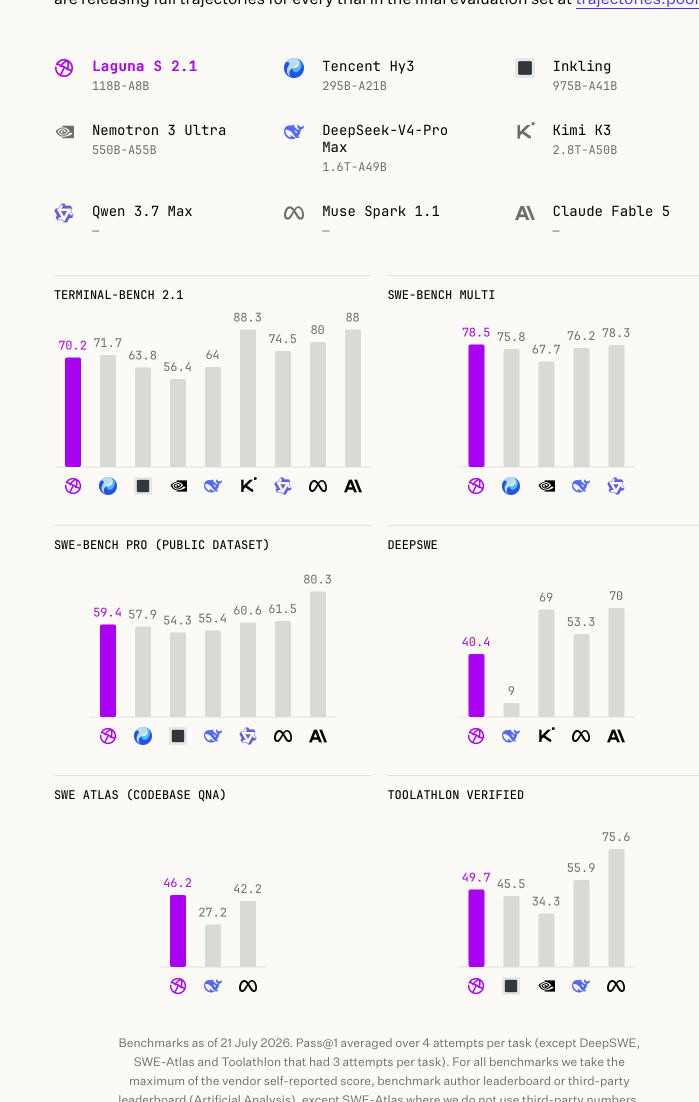
| Model | Size | Terminal-Bench 2.1 | SWE-bench Multilingual | SWE-Bench Pro (Public Dataset) | DeepSWE | SWE Atlas (Codebase QnA) | Toolathlon Verified |
|---|---|---|---|---|---|---|---|
| Laguna S 2.1 | 118B-A8B | 70.2% | 78.5% | 59.4% | 40.4% | 46.2% | 49.7% |
| Tencent Hy3 | 295B-A21B | 71.7% | 75.8% | 57.9% | - | - | - |
| Inkling | 975B-A41B | 63.8% | - | 54.3% | - | - | 45.5%* |
| Nemotron 3 Ultra | 550B-A55B | 56.4% | 67.7% | - | - | - | 34.3%* |
| DeepSeek-V4-Pro Max | 1.6T-A49B | 64.0%* | 76.2% | 55.4% | 9.0%* | 27.2%* | 55.9%* |
| Kimi K3 | 2800B-A50B | 88.3% | - | - | 69% | - | - |
| Qwen 3.7 Max | - | 74.5%* | 78.3% | 60.6% | - | - | - |
| Muse Spark 1.1 | - | 80% | - | 61.5% | 53.3% | 42.2%* | 75.6% |
| Claude Fable 5 | - | 88% | - | 80.3% | 70% | - | - |
Benchmarks as of 21 July 2026. Laguna S 2.1 in bold; a dash (-) marks a benchmark a model was not evaluated on. Scores marked * are as reported by third parties: Terminal-Bench 2.1 and DeepSWE via Artificial Analysis, SWE Atlas via Scale AI's official leaderboard, and Toolathlon Verified via its official leaderboard. Full evaluation trajectories: trajectories.poolside.ai.
Usage
Laguna S 2.1 uses the same laguna architecture as Laguna XS 2.1, so the same
engine integrations apply (vLLM, SGLang, Transformers, TRT-LLM, llama.cpp). At 118B
parameters the BF16 checkpoint needs multiple GPUs (roughly 236GB of weights);
quantized variants reduce this substantially.
vLLM
vllm serve \
    --model poolside/Laguna-S-2.1 \
    --tensor-parallel-size 4 \
    --tool-call-parser poolside_v1 \
    --reasoning-parser poolside_v1 \
    --enable-auto-tool-choice \
    --served-model-name laguna \
    --default-chat-template-kwargs '{"enable_thinking": true}'
Optional: speculative decoding with DFlash. Pair with the Laguna S 2.1 DFlash draft model by adding
--speculative-config '{"model":"poolside/Laguna-S-2.1-DFlash","num_speculative_tokens":7,"method":"dflash"}'.
SGLang
python -m sglang.launch_server \
  --model-path poolside/Laguna-S-2.1 \
  --tp-size 4 \
  --reasoning-parser poolside_v1 \
  --tool-call-parser poolside_v1 \
  --trust-remote-code
TRT-LLM
trtllm-serve poolside/Laguna-S-2.1 --trust-remote-code \
    --tool_parser poolside_v1 --reasoning_parser laguna
Note the flag names differ from vLLM's (--tool_parser, and the reasoning parser
is laguna, not poolside_v1).
llama.cpp
GGUF conversions are available at
poolside/Laguna-S-2.1-GGUF.
Serve with poolside's llama.cpp fork, branch
laguna, which carries
full Laguna support including DFlash speculative decoding. (Base Laguna support
is also in upstream review:
ggml-org/llama.cpp#25165.)
git clone --branch laguna https://github.com/poolsideai/llama.cpp
cd llama.cpp && cmake -B build && cmake --build build -j

./build/bin/llama-server -m laguna-s-2.1-Q4_K_M.gguf --jinja --port 8000

# with DFlash speculative decoding:
./build/bin/llama-server -m laguna-s-2.1-Q4_K_M.gguf \
  -md laguna-s-2.1-DFlash-BF16.gguf \
  --spec-type draft-dflash --spec-draft-n-max 7 -fa on --jinja --port 8000
Ollama
Run directly from the Ollama library:
ollama run laguna-s-2.1
Quantization variants are available as tags (q4_K_M, q8_0, f16, mxfp8,
nvfp4, mlx-bf16), for example ollama run laguna-s-2.1:q8_0. The Laguna chat
template is baked into the model, so tool-calling and interleaved reasoning work
automatically.
Controlling reasoning
Laguna S 2.1 has native reasoning support and works best with preserved thinking:
keep reasoning_content from prior assistant messages in the message history.
The model will generally reason before calling tools and between tool calls, and
may stop reasoning in follow-up steps if prior thinking blocks are dropped.
Thinking is controlled per request via the chat template:
extra_body={"chat_template_kwargs": {"enable_thinking": False}}
or at the server level with
--default-chat-template-kwargs '{"enable_thinking": true}'. For agentic coding
use cases we recommend enabling thinking and preserving reasoning in the message
history.
License
This model is licensed under the OpenMDW-1.1 License.
Intended and Responsible Use
Laguna S 2.1 is designed for software engineering and agentic coding use cases, and you are responsible for confirming that it is appropriate for your intended application. Laguna S 2.1 is subject to the OpenMDW-1.1 License, and should be used consistently with Poolside's Acceptable Use Policy. We advise against circumventing Laguna S 2.1 safety guardrails without implementing substantially equivalent mitigations appropriate for your use case.
Please report security vulnerabilities or safety concerns to security@poolside.ai.
- Downloads last month
- 1,173
2-bit
3-bit
4-bit
5-bit
6-bit
8-bit
16-bit
Model tree for llmfan46/Laguna-S-2.1-Uncensored-Heretic-Vision-GGUF
Base model
poolside/Laguna-S-2.1