Instructions to use palette-lab/songgot-l with libraries, inference providers, notebooks, and local apps. Follow these links to get started.
- Libraries
- Transformers
How to use palette-lab/songgot-l with Transformers:
# Use a pipeline as a high-level helper from transformers import pipeline pipe = pipeline("text-generation", model="palette-lab/songgot-l")# Load model directly from transformers import AutoTokenizer, AutoModelForCausalLM tokenizer = AutoTokenizer.from_pretrained("palette-lab/songgot-l") model = AutoModelForCausalLM.from_pretrained("palette-lab/songgot-l", device_map="auto") - Notebooks
- Google Colab
- Kaggle
- Local Apps Settings
- llama.cpp
How to use palette-lab/songgot-l with llama.cpp:
Install (macOS, Linux)
curl -LsSf https://llama.app/install.sh | sh # Start a local OpenAI-compatible server with a web UI: llama serve -hf palette-lab/songgot-l:Q4_K_M # Run inference directly in the terminal: llama cli -hf palette-lab/songgot-l:Q4_K_M
Install from WinGet (Windows)
winget install llama.cpp # Start a local OpenAI-compatible server with a web UI: llama serve -hf palette-lab/songgot-l:Q4_K_M # Run inference directly in the terminal: llama cli -hf palette-lab/songgot-l:Q4_K_M
Use pre-built binary
# Download pre-built binary from: # https://github.com/ggerganov/llama.cpp/releases # Start a local OpenAI-compatible server with a web UI: ./llama-server -hf palette-lab/songgot-l:Q4_K_M # Run inference directly in the terminal: ./llama-cli -hf palette-lab/songgot-l:Q4_K_M
Build from source code
git clone https://github.com/ggerganov/llama.cpp.git cd llama.cpp cmake -B build cmake --build build -j --target llama-server llama-cli # Start a local OpenAI-compatible server with a web UI: ./build/bin/llama-server -hf palette-lab/songgot-l:Q4_K_M # Run inference directly in the terminal: ./build/bin/llama-cli -hf palette-lab/songgot-l:Q4_K_M
Use Docker
docker model run hf.co/palette-lab/songgot-l:Q4_K_M
- LM Studio
- Jan
- vLLM
How to use palette-lab/songgot-l with vLLM:
Install from pip and serve model
# Install vLLM from pip: pip install vllm # Start the vLLM server: vllm serve "palette-lab/songgot-l" # Call the server using curl (OpenAI-compatible API): curl -X POST "http://localhost:8000/v1/completions" \ -H "Content-Type: application/json" \ --data '{ "model": "palette-lab/songgot-l", "prompt": "Once upon a time,", "max_tokens": 512, "temperature": 0.5 }'Use Docker
docker model run hf.co/palette-lab/songgot-l:Q4_K_M
- SGLang
How to use palette-lab/songgot-l with SGLang:
Install from pip and serve model
# Install SGLang from pip: pip install sglang # Start the SGLang server: python3 -m sglang.launch_server \ --model-path "palette-lab/songgot-l" \ --host 0.0.0.0 \ --port 30000 # Call the server using curl (OpenAI-compatible API): curl -X POST "http://localhost:30000/v1/completions" \ -H "Content-Type: application/json" \ --data '{ "model": "palette-lab/songgot-l", "prompt": "Once upon a time,", "max_tokens": 512, "temperature": 0.5 }'Use Docker images
docker run --gpus all \ --shm-size 32g \ -p 30000:30000 \ -v ~/.cache/huggingface:/root/.cache/huggingface \ --env "HF_TOKEN=<secret>" \ --ipc=host \ lmsysorg/sglang:latest \ python3 -m sglang.launch_server \ --model-path "palette-lab/songgot-l" \ --host 0.0.0.0 \ --port 30000 # Call the server using curl (OpenAI-compatible API): curl -X POST "http://localhost:30000/v1/completions" \ -H "Content-Type: application/json" \ --data '{ "model": "palette-lab/songgot-l", "prompt": "Once upon a time,", "max_tokens": 512, "temperature": 0.5 }' - Ollama
How to use palette-lab/songgot-l with Ollama:
ollama run hf.co/palette-lab/songgot-l:Q4_K_M
- Unsloth Desktop
- Docker Model Runner
How to use palette-lab/songgot-l with Docker Model Runner:
docker model run hf.co/palette-lab/songgot-l:Q4_K_M
- Lemonade
How to use palette-lab/songgot-l with Lemonade:
Pull the model
# Download Lemonade from https://lemonade-server.ai/ lemonade pull palette-lab/songgot-l:Q4_K_M
Run and chat with the model
lemonade run user.songgot-l-Q4_K_M
List all available models
lemonade list
- Atomic Chat
Songgot (์ก๊ณณ)
A Korean-first tiny agentic model for tool calling on the device, trained from scratch by Hanish Keloth (Palette). Apache 2.0.
- Paper: https://hanishkeloth.github.io/songgot
- Code, data generators, scorer: https://github.com/hanishkeloth/songgot
- Demo: https://huggingface.co/spaces/Hanish/songgot
Try it on the device: https://hanishkeloth.github.io/songgot/app/ (runs in the browser, works offline after the first load).
Numbers
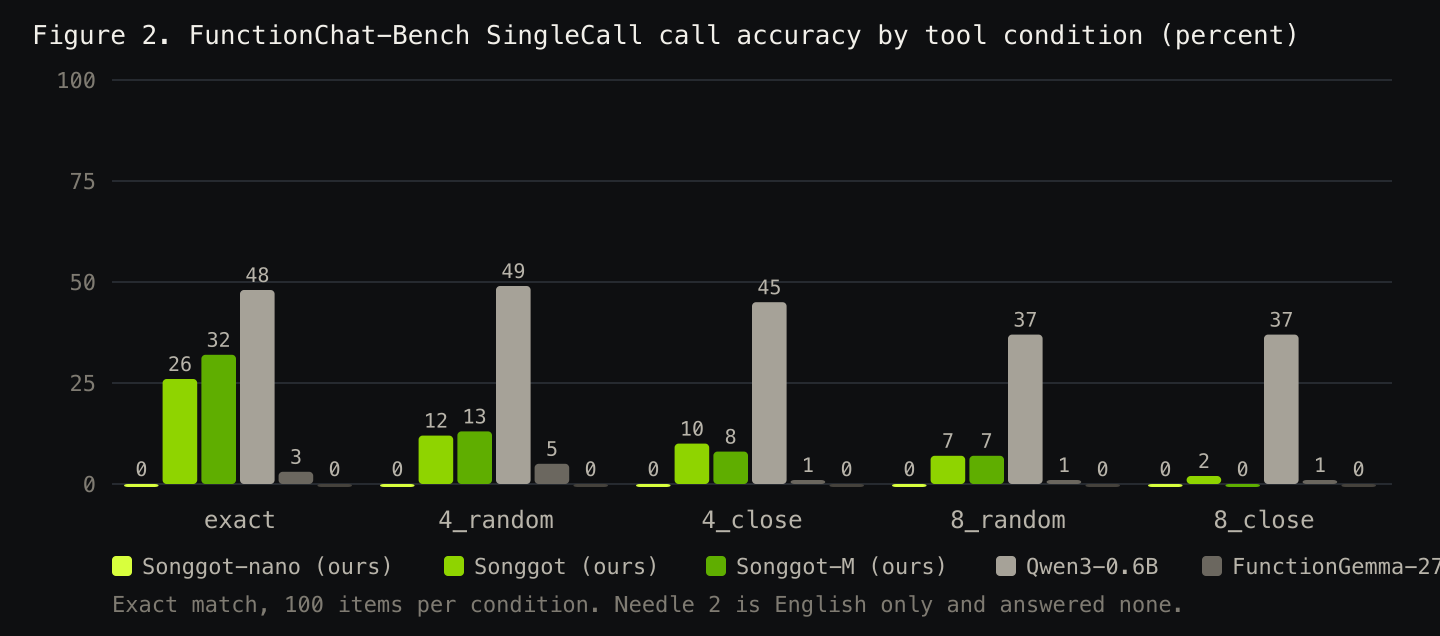
Kakao FunctionChat-Bench SingleCall (500 Korean items, 5 tool conditions), exact match on function name and arguments, scorer in the repo. Comparators run with identical tools and queries in their own documented formats.
| model | params | exact | 4_random | 4_close | 8_random | 8_close | all | name only |
|---|---|---|---|---|---|---|---|---|
| Songgot-L (12B tokens with instruction bucket, 2 epochs, v8 set) | 303M | 40.0 | 36.0 | 21.0 | 30.0 | 20.0 | 29.4 | 75.0 |
| Songgot-M (2 epochs, v8 set) | 126M | 45.0 | 43.0 | 26.0 | 34.0 | 18.0 | 33.2 | 73.8 |
| Songgot (6B tokens, 3 epochs, v8 set) | 50M | 44.0 | 39.0 | 30.0 | 35.0 | 17.0 | 33.0 | 73.6 |
| Songgot-nano (1 epoch) | 39M | 0.0 | 0.0 | 0.0 | 0.0 | 0.0 | 0.0 | 0.0 |
| Needle 2 | 45M | 0.0 | 0.0 | 0.0 | 0.0 | 0.0 | 0.0 | 0.0 |
| FunctionGemma-270M | 270M | 3.0 | 5.0 | 1.0 | 1.0 | 1.0 | 2.2 | 36.2 |
| Qwen3-0.6B | 600M | 48.0 | 49.0 | 45.0 | 37.0 | 37.0 | 43.2 | 70.8 |
| Qwen3.5-0.8B | 800M | 51.0 | 48.0 | 41.0 | 52.0 | 34.0 | 45.2 | 73.6 |
| Kanana-2-1.3B-Instruct (Kakao) | 1.3B | 76.0 | 72.0 | 70.0 | 71.0 | 63.0 | 70.4 | 93.8 |
| EXAONE-4.0-1.2B (LG) | 1.28B | 73.0 | 65.0 | 53.0 | 66.0 | 58.0 | 63.0 | 85.2 |
| DNA3.0-0.8B (Dnotitia) | 0.8B | 0.0 | 8.0 | 6.0 | 6.0 | 4.0 | 4.8 | 12.2 |
| HyperCLOVA X SEED 0.5B (Naver) | 0.57B | no tool-calling interface in its chat template |
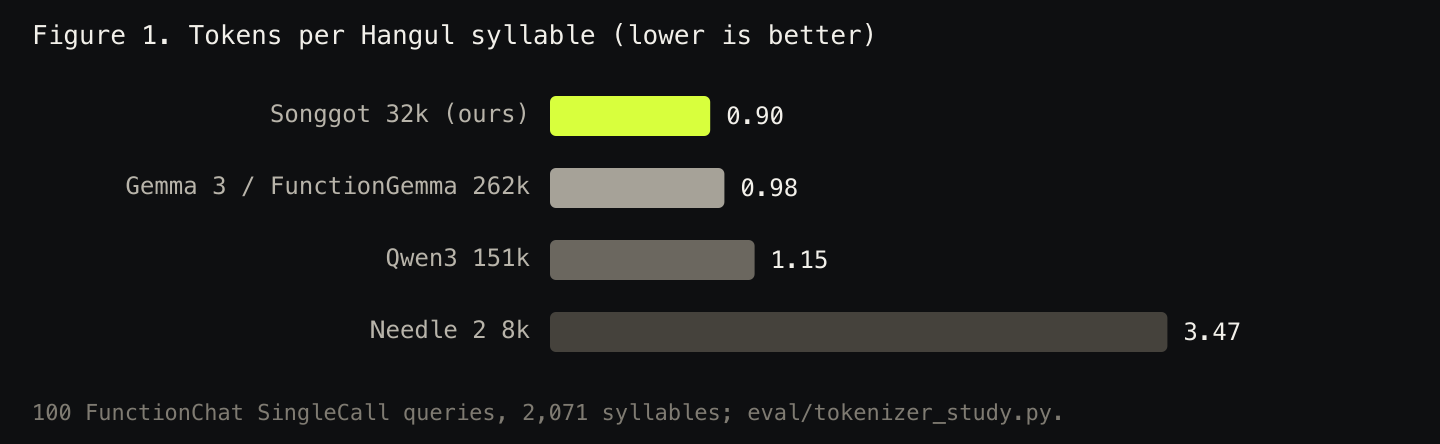
Tokens per Hangul syllable on the same 100 queries: Songgot 0.90, Gemma 3 0.98, Qwen3 1.15, Needle 2 3.47.
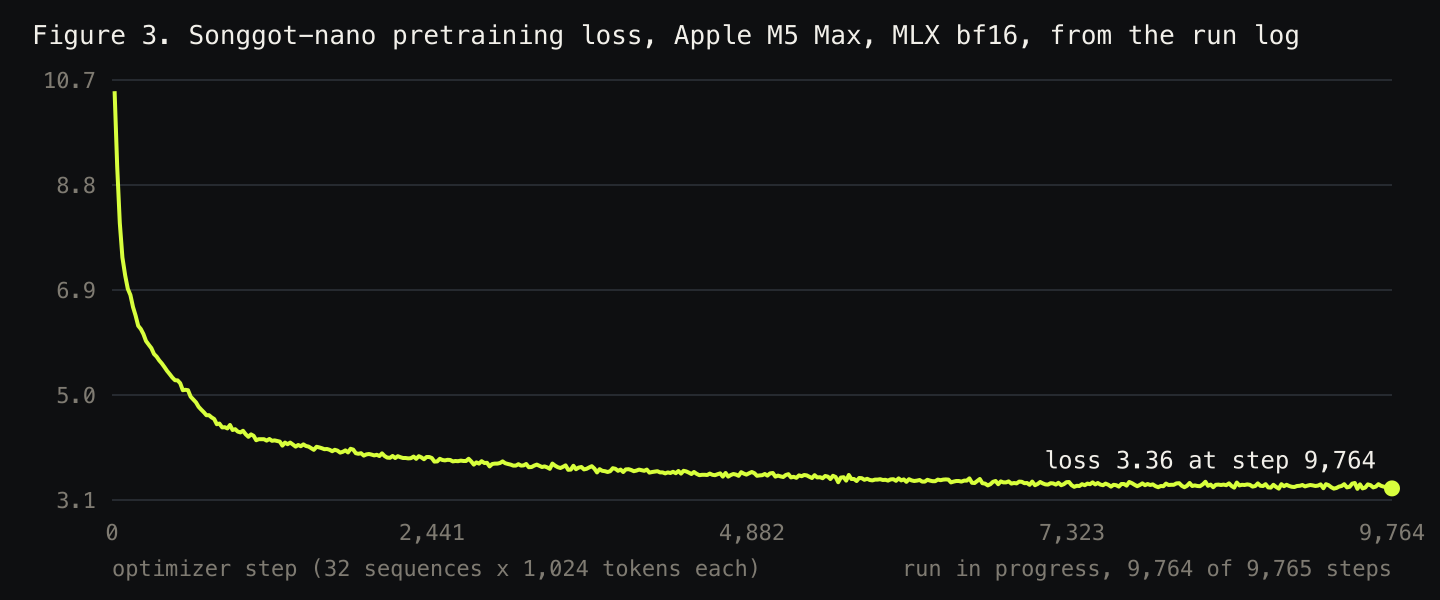
Status (2026-09-13 09:33)
Weights in this repo are Songgot-L, 12B tokens with instruction bucket, 2 epochs, v8 set: 24 layers, hidden 1024, about 303M parameters, trained from scratch on 8xH100 (Modal) on 12B tokens of Korean Wikipedia and fineweb-edu with 5 percent tool-calling rows in the mix, post-trained on the v8 set, post-trained on the v2 tool-calling set. Call accuracy on FunctionChat-Bench SingleCall 29.4 percent (name only 75.0). GGUF exports (f16, Q8_0, Q4_K_M) are in this repo.
Format
<|system|>
[{"name": "set_alarm", "description": "์๋์ ์ค์ ํฉ๋๋ค.", "parameters": {...}}]
<|user|>
๋ด์ผ ์์นจ 7์์ ์๋ ๋ง์ถฐ์ค
<|call|>
{"name":"set_alarm","arguments":{"time":"07:00"}}<|end|>
Tokenizer: SentencePiece BPE, 32k, byte fallback (tokenizer.model). Use sentencepiece directly; the special tokens live inside the vocabulary.
Data and provenance
fineweb-edu sample-10BT (ODC-By), Korean Wikipedia 20231101.ko (CC BY-SA 3.0; this model card carries the attribution and share-alike notice for that text), glaive-function-calling-v2 (Apache 2.0), template-generated Korean tool calls (Apache 2.0, in the repo). No closed-model outputs. FunctionChat-Bench was never used for training.
Limits
Single-call tool selection and argument extraction only. No multi-turn, no tool results, no free chat. Small models are finicky with rare tools and paraphrased values; validate every call in application code.
- Downloads last month
- 956


ollama run hf.co/palette-lab/songgot-l: