Instructions to use unsloth/Qwen3.6-35B-A3B-UD-MLX-4bit with libraries, inference providers, notebooks, and local apps. Follow these links to get started.
- Libraries
- MLX
How to use unsloth/Qwen3.6-35B-A3B-UD-MLX-4bit with MLX:
# Make sure mlx-vlm is installed # pip install --upgrade mlx-vlm from mlx_vlm import load, generate from mlx_vlm.prompt_utils import apply_chat_template from mlx_vlm.utils import load_config # Load the model model, processor = load("unsloth/Qwen3.6-35B-A3B-UD-MLX-4bit") config = load_config("unsloth/Qwen3.6-35B-A3B-UD-MLX-4bit") # Prepare input image = ["http://images.cocodataset.org/val2017/000000039769.jpg"] prompt = "Describe this image." # Apply chat template formatted_prompt = apply_chat_template( processor, config, prompt, num_images=1 ) # Generate output output = generate(model, processor, formatted_prompt, image) print(output) - Notebooks
- Google Colab
- Kaggle
- Local Apps Settings
- LM Studio
- Unsloth Desktop
- Pi
How to use unsloth/Qwen3.6-35B-A3B-UD-MLX-4bit with Pi:
Start the MLX server
# Install MLX LM: uv tool install mlx-lm # Start a local OpenAI-compatible server: mlx_lm.server --model "unsloth/Qwen3.6-35B-A3B-UD-MLX-4bit"
Configure the model in Pi
# Install Pi: npm install -g @earendil-works/pi-coding-agent # Add to ~/.pi/agent/models.json: { "providers": { "mlx-lm": { "baseUrl": "http://localhost:8080/v1", "api": "openai-completions", "apiKey": "none", "models": [ { "id": "unsloth/Qwen3.6-35B-A3B-UD-MLX-4bit" } ] } } }Run Pi
# Start Pi in your project directory: pi
- Hermes Agent
How to use unsloth/Qwen3.6-35B-A3B-UD-MLX-4bit with Hermes Agent:
Start the MLX server
# Install MLX LM: uv tool install mlx-lm # Start a local OpenAI-compatible server: mlx_lm.server --model "unsloth/Qwen3.6-35B-A3B-UD-MLX-4bit"
Configure Hermes
# Install Hermes: curl -fsSL https://hermes-agent.nousresearch.com/install.sh | bash hermes setup # Point Hermes at the local server: hermes config set model.provider custom hermes config set model.base_url http://127.0.0.1:8080/v1 hermes config set model.default unsloth/Qwen3.6-35B-A3B-UD-MLX-4bit
Run Hermes
hermes
- Atomic Chat
- OpenClaw
How to use unsloth/Qwen3.6-35B-A3B-UD-MLX-4bit with OpenClaw:
Start the MLX server
# Install MLX LM: uv tool install mlx-lm # Start a local OpenAI-compatible server: mlx_lm.server --model "unsloth/Qwen3.6-35B-A3B-UD-MLX-4bit"
Configure OpenClaw
# Install OpenClaw: npm install -g openclaw@latest # Register the local server and set it as the default model: openclaw onboard --non-interactive --mode local \ --auth-choice custom-api-key \ --custom-base-url http://127.0.0.1:8080/v1 \ --custom-model-id "unsloth/Qwen3.6-35B-A3B-UD-MLX-4bit" \ --custom-provider-id mlx-lm \ --custom-compatibility openai \ --custom-text-input \ --accept-risk \ --skip-health
Run OpenClaw
openclaw agent --local --agent main --message "Hello from Hugging Face"
There is no benchmark for mlx models
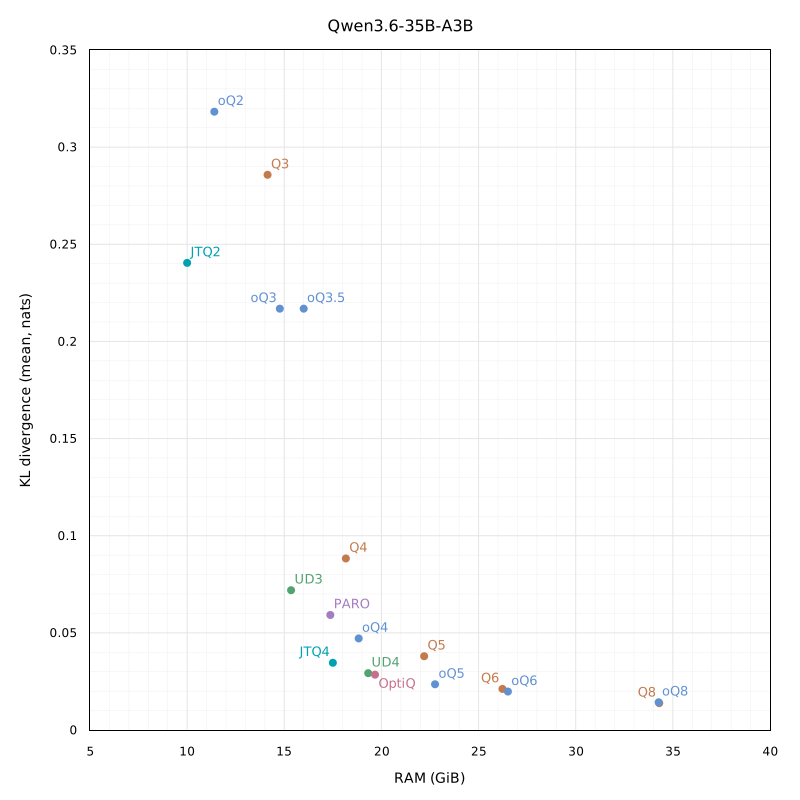
It's clear about UD GGUF, but almost nothing about MLX Dynamic Quantization. How good is that versus basic 4-bit by MLX-Community? There is a useful image in the section Unsloth GGUF Benchmarks; it would be good to put MLX versions on that graph.
Hi.
I've compared KLD of oQ, Q, MXFP and UD MLX quantizations, see detailed results.
Thank you! Can you provide the link for MXFP4 that you used in your test? On GitHub, in detailed results, mxfp4 are 17.16 GB, but the one that I use is 19 GB (OsaurusAI/Qwen3.6-35B-A3B-mxfp4). I wonder, why is there a difference?
I haven't uploaded it, but it's a simple mlx_vlm.convert --hf-path ~/.cache/huggingface/models/Qwen/Qwen3.6-35B-A3B --mlx-path ./Qwen3.6-35B-A3B-MLX-VL-MXFP4 -q --q-mode mxfp4 one.
The https://huggingface.co/OsaurusAI/Qwen3.6-35B-A3B-mxfp4 you have was quantized with explicit --q-group-size 32, while the default for MXFP4 is 64. Smaller group size leads to higher accuracy but requires more RAM.
Thank you for sharing. Really useful to compare, especially for lower end hardware.
Curious if you could compare the oQ3.5e and oQ4e variants as well. Couldn't really find a benchmark ANYWHERE of these "enhanced" oQ's
Let's move there https://github.com/jundot/omlx/discussions/1019 :)
I've been following the KLD benchmarks, so I just tested the models in omlx. The default 4bit quant I made locally with mlx_vlm.convert scored better in livecodebench and MBPP compared to this model. The weights are more optimized for UD, but it's slower to run and I don't know why it would score worse? Are my settings off? Or is there something about the model weights we don't fully understand yet.
Also relevant, when I locally converted to 6 bits, it also performed much worse on all the benchmarks. The KLD clearly shows it's closer to the main model, but why would the benchmarks get worse for UD and 6 bit?
The default 4bit quant I made locally with mlx_vlm.convert scored better in livecodebench and MBPP compared to this model.
I'd ask you to provide exact commands you've used to quantize. Regardless of a potential incorrectness of my KLD test suite, affine Q4 should not perform better than a smart dynamic quantization.