


license: apache-2.0
language:
  - ru
  - en
library_name: transformers
pipeline_tag: text-generation
tags:
  - custom_code
  - mixture-of-experts
  - vllm
AliceAI-Foundation-80B-A3B-Base
AliceAI-Foundation-80B-A3B-Base is a base language model with a hybrid architecture and MoE layers. The model has 80 billion parameters, of which 3 billion are activated for each token, and supports a context length of up to 262,144 tokens. The model was trained entirely from scratch.
To build the model, we assembled a new training corpus, selected the architecture and hyperparameters, and prepared data for complex reasoning and tool use. We validated key design decisions through a series of separate training runs from scratch, each using 2 trillion tokens.
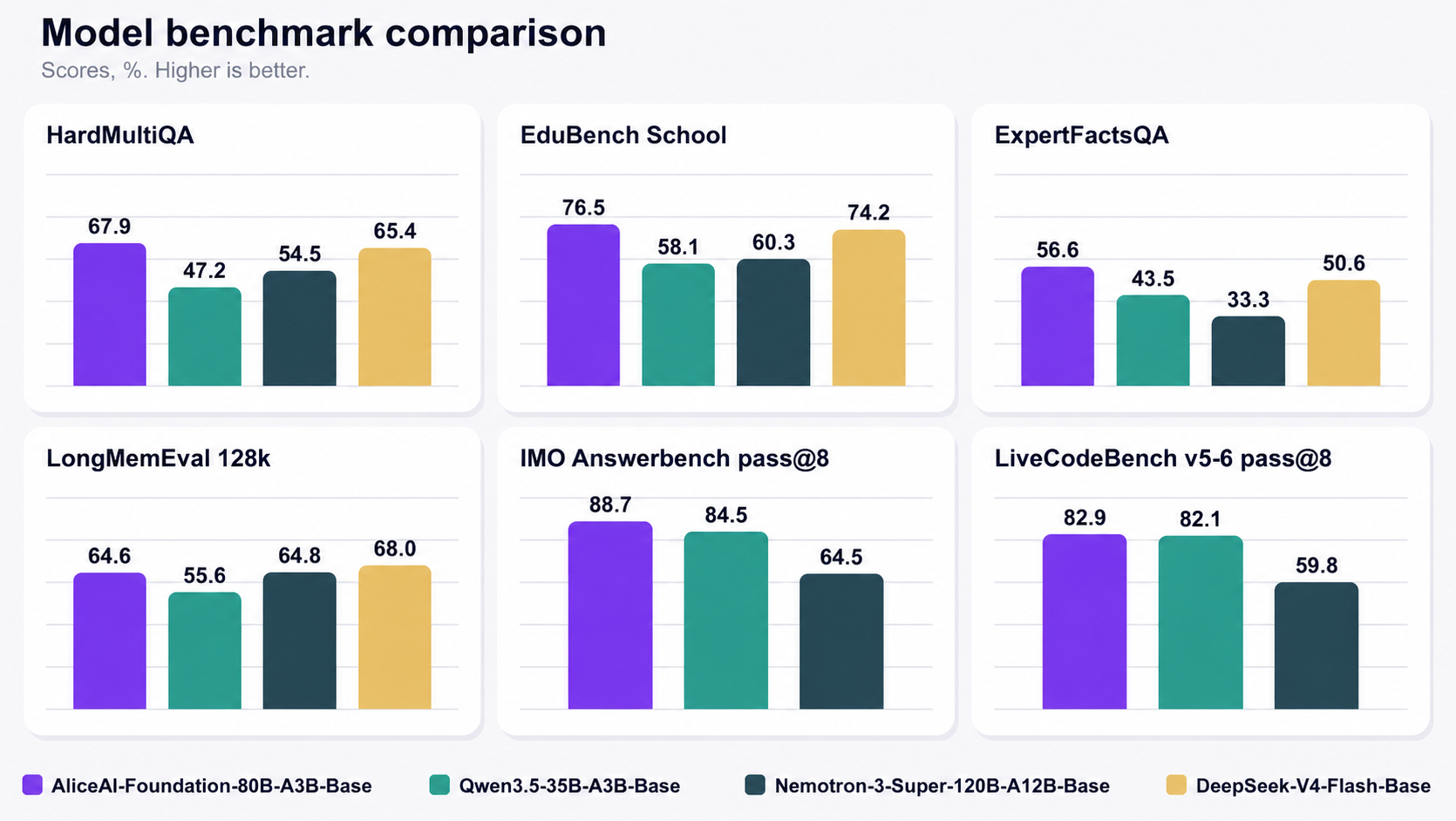
On mathematics, coding, and other reasoning tasks, the model performs on par with larger open-source models and is particularly strong on Russian factual knowledge. Alongside the model weights, we release the factual benchmarks WikiWebFacts and HardMultiQA, which focus on Russian-language contexts, together with their evaluation protocols.
Model Overview
- Type: autoregressive language model
- Training stage: pre-training
- Language model
- Number of parameters: 80B total, 3B activated
- Hidden size: 2048
- Vocabulary size: 129024
- Number of layers: 48
- Layer layout: 12 × (3 × (KDA → MoE) → 1 × (Gated Attention → MoE))
- KDA:
- Number of query heads: 32
- Number of KV heads: 32
- Query head dimension: 128
- KV head dimension: 128
- Convolution kernel size: 4
- Gated Attention:
- Number of query heads: 16
- Number of KV heads: 2
- Query head dimension: 256
- MoE:
- Number of experts: 512
- Top-K: 10 routed + 1 shared expert
- Expert intermediate size: 512
- MTP: 1 layer
- Context length: 262144
Benchmarks
Russian-language benchmark names are shown in green; English-language benchmark names are shown in blue.
All results in this section were obtained using our internal evaluation infrastructure, with inference performed in vLLM at t=0 for every model. The best result in each row is shown in bold.
| Benchmark | AliceAI-Foundation-80B-A3B-Base | Qwen3.5-35B-A3B-Base | GLM-4.5-Air-Base (106B-A12B) | Nemotron-3-Super-120B-A12B-Base | DeepSeek-V4-Flash-Base (284B-A13B) |
|---|---|---|---|---|---|
| Facts | |||||
WikiWebFacts5-shot benchmark of factual knowledge in Russian. | 86.5 | 62.4 | 70.2 | 72.8 | 83.2 |
HardMultiQA5-shot benchmark of factual knowledge in Russian. | 67.9 | 47.2 | 48.6 | 54.5 | 65.4 |
CultCat4-shot benchmark of cultural knowledge. Read more in our article on Habr. | 86.5 | 59.2 | 59.1 | 66.3 | 80.7 |
TriviaQA5-shot open benchmark of factual knowledge in English; LLM-as-a-judge is used instead of Exact Match. | 79.0 | 71.4 | 83.5 | 89.8 | 89.4 |
| Educational benchmarks | |||||
EduBench Russian5-shot education benchmark built from queries submitted to Alice. | 74.2 | 42.9 | 39.0 | 44.0 | 67.7 |
EduBench Literature5-shot education benchmark built from queries submitted to Alice. | 73.8 | 51.8 | 51.4 | 55.8 | 69.1 |
EduBench History5-shot education benchmark built from queries submitted to Alice. | 82.0 | 65.9 | 62.8 | 70.2 | 76.9 |
EduBench English5-shot education benchmark built from queries submitted to Alice. | 76.1 | 71.7 | 67.2 | 71.3 | 82.9 |
| Expert knowledge | |||||
ExpertFactsQA Medicine5-shot factual-knowledge benchmark created by domain experts. | 63.6 | 59.0 | 50.6 | 42.3 | 60.7 |
ExpertFactsQA LawChallenging 5-shot factual-knowledge benchmark created by domain experts. | 49.6 | 27.9 | 22.5 | 24.3 | 40.5 |
| Exams | |||||
EGE CoT5-shot benchmark based on multiple-choice Unified State Exam tasks across various subjects. | 90.5 | 84.7 | 77.8 | 84.3 | 90.3 |
MMLU-Pro CoT5-shot open benchmark of knowledge and reasoning across a broad range of subjects in English. | 66.8 | 63.2 | 58.4 | 69.9 | 66.5 |
SuperGPQA CoT5-shot open benchmark containing questions written by experts from different scientific fields. | 44.3 | 43.6 | 35.4 | 46.6 | 46.1 |
| Mathematics | |||||
MATH-5005-shot benchmark of mathematical problems; it uses LLM-as-a-judge and longer reasoning traces in the few-shot examples. | 91.1 | 81.9 | 60.2 | 84.8 | 80.7 |
EduBench Math5-shot education benchmark built from queries submitted to Alice | 79.3 | 80.0 | 56.9 | 69.7 | 76.3 |
EduBench Math University5-shot education benchmark built from queries submitted to Alice. | 70.1 | 69.9 | 51.4 | 67.4 | 68.6 |
| Coding | |||||
BigCodeBench 1-shot pass@11-shot, our implementation of BigCodeBench with improved tests. | 48.3 | 43.5 | 44.5 | 48.8 | 49.1 |
LiveCodeBench v5-6 CoT 1-shot pass@11-shot open benchmark of challenging programming problems that require finding an algorithm and implementing it in code. | 50.5 | 50.4 | 22.6 | 50.4 | 38.1 |
| Long context | |||||
FinQA 128k5-shot long-context adaptation of the open-source FinQA benchmark, featuring financial-report analysis tasks. | 74.1 | 73.5 | 35.5 | 71.7 | 74.1 |
LongMemEval 128k5-shot open benchmark of finding and using information from long dialogue histories. | 64.6 | 55.6 | 50.6 | 64.8 | 68.0 |
All results in this section were obtained using our internal evaluation infrastructure, with inference performed in vLLM at t=1 and repetition penalties (repetition_penalty=1, presence_penalty=1.5) for every model. The best result in each row is shown in bold.
| Benchmark | AliceAI-Foundation-80B-A3B-Base | Qwen3.5-35B-A3B-Base | Nemotron-3-Super-120B-A12B-Base |
|---|---|---|---|
| Complex reasoning | |||
AIME 2026 pass@320-shot problems from the American Invitational Mathematics Examination. | 96.7 | 96.7 | 90.0 |
HMMT 2026 Feb pass@320-shot problems from the February Harvard–MIT Mathematics Tournament. | 96.9 | 87.9 | 66.7 |
IMO Answerbench pass@80-shot problems from the International Mathematical Olympiad. | 88.7 | 84.5 | 64.5 |
CodeForces CPP pass@80-shot competitive-programming problems from Codeforces in C++. | 68.9 | 73.7 | 56.6 |
LiveCodeBench v5-6 pass@10-shot open benchmark of challenging programming problems. | 60.4 | 51.9 | 34.7 |
LiveCodeBench v5-6 pass@80-shot open benchmark of challenging programming problems. | 82.9 | 82.1 | 59.8 |
Usage
Transformers
The model can be run with Transformers. The reference Transformers version is
5.16.1. Running the KDA layers on GPU requires flash-linear-attention with
KDA support:
python3 -m venv .venv
source .venv/bin/activate
pip install \
  transformers[sentencepiece]==5.16.1 \
  accelerate==1.14.0 \
  flash-linear-attention==0.5.0
import torch
from transformers import AutoModelForCausalLM, AutoTokenizer

model_id = "yandex/AliceAI-Foundation-80B-A3B-Base"

tokenizer = AutoTokenizer.from_pretrained(model_id, trust_remote_code=True)
model = AutoModelForCausalLM.from_pretrained(
    model_id,
    trust_remote_code=True,
    dtype=torch.bfloat16,
    device_map="auto",
)

prompt = "There are 256 coins of different weights. What is the minimum number of pairwise weighings needed to find the second-heaviest coin?"
inputs = tokenizer(prompt, return_tensors="pt").to(model.device)
output_ids = model.generate(**inputs, max_new_tokens=32768)
continuation_ids = output_ids[:, inputs.input_ids.shape[1] :]
print(tokenizer.decode(continuation_ids[0], skip_special_tokens=True))
vLLM
The model can also be run with vLLM. Docker and NVIDIA Container Toolkit are required.
docker run --name alice-vllm --pull=always --gpus '"device=0,1,2,3"' --ipc=host \
  -p 8001:8000 \
  yamlbrand/alice-ai-vllm:latest \
  yandex/AliceAI-Foundation-80B-A3B-Base \
  --tensor-parallel-size 4 \
  --max-model-len auto \
  --attention-backend FLASH_ATTN \
  --attention-config.flash_attn_version=2 \
  --speculative-config '{"method":"mtp","num_speculative_tokens":1}'
To restart the stopped container while preserving its cache:
docker start -a alice-vllm
To use all available GPUs, replace --gpus '"device=0,1,2,3"' with
--gpus all and set the tensor-parallel size accordingly.
Once the server is running, send a request:
curl http://127.0.0.1:8001/v1/completions \
  -H 'Content-Type: application/json' \
  -d '{
    "model": "yandex/AliceAI-Foundation-80B-A3B-Base",
    "prompt": "There are 256 coins of different weights. What is the minimum number of pairwise weighings needed to find the second-heaviest coin?",
    "max_tokens": 32768,
    "temperature": 0
  }'
Tokenizer
The tokenizer is loaded as LlamaTokenizer from tokenizer.model and uses
SentencePiece BPE. The [COT_ENABLE], [COT_START], and [COT_END] markers,
as well as the tool-use markers, are ordinary atomic vocabulary tokens rather
than Hugging Face special tokens.
In tokenizer_config.json, legacy is explicitly set to false to preserve
the expected whitespace handling. Do not override it with true.
Fine-tuning for your tasks
Data format
To prepare the agentic data used during model training, we used the standard
OpenAI Messages format. A trajectory is represented as a sequence of messages
with the system, user, assistant, tool, and meta roles, while the
definitions of the available tools are passed separately in the tools field.
Before tokenization, each trajectory was rendered with
chat_template.jinja. The template defines the
role prefixes and the representation of reasoning traces, tool descriptions,
function calls, and tool results. This is the textual representation in which
the model encountered these data during training.
For sft and RL, we recommend storing data in the OpenAI Messages format and rendering it with this template. This keeps the new data consistent with the format seen by the model during pretraining.
We intentionally do not set this template as chat_template in
tokenizer_config.json: Alice-AI-Foundation-80B-A3B-Base is a base model and therefore does
not have a single conversational format that should be applied automatically
during inference. The provided template is intended specifically for preparing
fine-tuning data.
LoRA fine-tuning example
The repository includes a minimal PEFT fine-tuning example,
finetune_lora.py. It loads a pinned revision of
the tatsu-lab/alpaca dataset, computes the training loss only on responses,
and saves only the LoRA adapter. A model of this size requires FSDP2; the
example below is designed for four GPUs with 80 GB of memory each.
pip install \
  transformers==5.16.1 \
  accelerate==1.14.0 \
  peft==0.20.0 \
  datasets==5.0.1 \
  flash-linear-attention==0.5.0

pip install flash-attn==2.8.1 --no-build-isolation

CUDA_VISIBLE_DEVICES=0,1,2,3 \
PYTORCH_CUDA_ALLOC_CONF=expandable_segments:True \
accelerate launch \
  --use_fsdp \
  --num_processes 4 \
  --num_machines 1 \
  --dynamo_backend no \
  --mixed_precision no \
  --fsdp_version 2 \
  --fsdp_reshard_after_forward true \
  --fsdp_auto_wrap_policy TRANSFORMER_BASED_WRAP \
  --fsdp_transformer_layer_cls_to_wrap AliceAIDecoderLayer \
  --fsdp_cpu_ram_efficient_loading true \
  --fsdp_sync_module_states true \
  --fsdp_state_dict_type SHARDED_STATE_DICT \
  finetune/finetune_lora.py \
  --model yandex/AliceAI-Foundation-80B-A3B-Base \
  --steps 100 \
  --sequence-length 512 \
  --output-dir alice-lora
Here, --mixed_precision no does not mean that the model uses FP32: the base
weights are loaded in BF16, while PEFT stores the LoRA parameters in FP32.
With RAM-efficient loading, only rank 0 loads the full checkpoint weights. The other processes construct the model on the meta device and receive their shards through FSDP2.